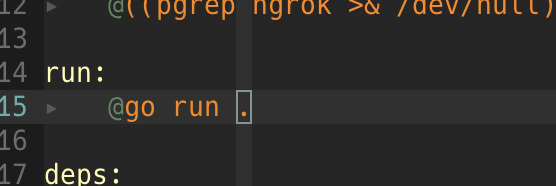
別ファイルに書いた main パッケージの Function が undefined 判定される

別ファイルに書いた main パッケージの Function が undefined 判定される ここに答えがあった go - “undefined” function declared in another file? - Stack Overflow Please read “How to Write Go Code”. Use go build or go install within the package directory, or supply an import path for the package. Do not use file arguments for build or install. While you can use file arguments for go run, you should build a package instead, usually with go run ....

2021-11-26 ·  2023-09-22 · 1 分 · 97 文字

ConoHa WING by GMO

国内最速 レンタルサーバ 楽天ひかり

2021-06-13 ·  2021-06-13 · 1 分 · 3 文字

trap コマンドは pipe と併用すると動作しない

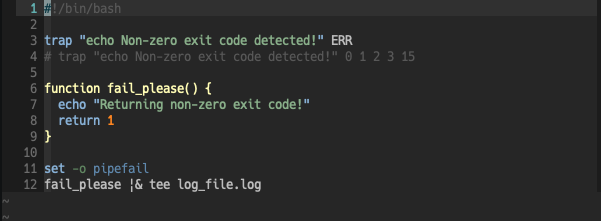
trap コマンドは pipe と併用すると動作しない 以下のBashスクリプトがあった場合に、パイプで出力全部ログ吐いちゃおう、 っておもったらうまくERRトラップが動かなくなったので、メモ 動くコード #!/bin/bash trap "echo Non-zero exit code detected!" ERR function fail_please() { echo "Returning non-zero exit code!" return 1 } fail_please # 出力結果 Returning non-zero exit code! Non-zero exit code detected! 動かないコード #!/bin/bash trap "echo Non-zero exit code detected!" ERR function fail_please() { echo "Returning non-zero exit code!" return 1 } fail_please |& tee log_file.log # 出力結果 Returning non-zero exit code! Bash: Trap ERR does not work when pipe operator is used The ERR trap fires for “simple commands” a pipeline is not a simple command....

2021-04-09 ·  2021-04-19 · 1 分 · 142 文字

ApiGatewayのログを ServerlessFramework で設定したい

要件としては、ApiGateway <=> Lambda の統合設定条件配下にて、 Lambdaからの応答結果が6MBを超えた場合に以下のようなログが出力される Lambda execution failed with status 200 due to customer function error: body size is too long. Lambda request id: XXXX-XXXX... これに対して、ServerlessFramework でログ設定を行いたい 参考 Serverless.yml Reference Enhancements for API Gateway REST API log setup Serverless complains about “Rest API id could not be resolved.” ApiGateway ステージ ログ/トレース の設定と動作 IAM Policy作成含め以下の設定だけで作成される provider: logs: restApi: accessLogging: false # Optional configuration which enables or disables access logging. Defaults to true....

2019-11-11 ·  2019-11-11 · 1 分 · 148 文字

Congnitoの発行するトークンの意味と動作

参考URL https://dev.classmethod.jp/cloud/aws/study-tokens-of-cognito-user-pools/ 理解 Cognito トークンには3つ種類がある IDトークン クライムを表すトークン (JWT) アクセストークン Cognitoユーザ属性を表示、更新等行う為のトークン (JWT) リフレッシュトークン IDトークン、アクセストークンを更新する為のもの CognitoクライアントID設定画面で有効期限を設定できる デフォルトは30日(1-3650日指定可能) ID/アクセストークンは1時間で無効になる リフレッシュトークンが有効な間はID/アクセストークンは自動更新される getSession で自動更新

2019-11-05 ·  2019-11-05 · 1 分 · 19 文字