結論
- hurl の変数はファイルごとに作り直される。
hurl login.hurl me.hurlで login.hurl が capture した値は me.hurl に届かず、me.hurl はUndefined variableで exit 3 になる --variableの値は、数字だけなら数値として読まれる。+819098765432は819098765432、09012345678は9012345678、1.50は1.5として届く。書いた文字のまま渡すなら"..."で囲む--variables-fileは値の$VARも$(...)も展開しない。同じ名前を--variableでも渡すと、渡す順に関係なく--variableの値が使われる- 環境変数で届くのは
HURL_VARIABLE_<name>とHURL_SECRET_<name>だけで、HURL_<name>は届かない。ファイルで使わない変数を渡しても、エラーも警告も出ない - jsonpath の結果は件数で型が変わる。フィルタの一致が 0 件なら値なし (none)、1 件ならその値、2 件以上ならリストになる。1 件の
count == 1はFilter errorで落ち、2 件を capture して{{}}で埋め込むとUnrenderable expressionで落ちる - 値が
nullなのとキーが無いのは別の状態で、not existsはキーが無いときだけ通る。ただし親がnullなら、その下のキーへのnot existsは通る
以下は hurl 8.0.1 / bash 5.3.15 / linux/amd64 で実測した。要求は手元で立てたサーバ (/echo は受けた要求の X- ヘッダを JSON で返し、それ以外のパスは同名の JSON ファイルを返す) に送った。
前提: 変数は型を持ち、ファイルごとに作り直される
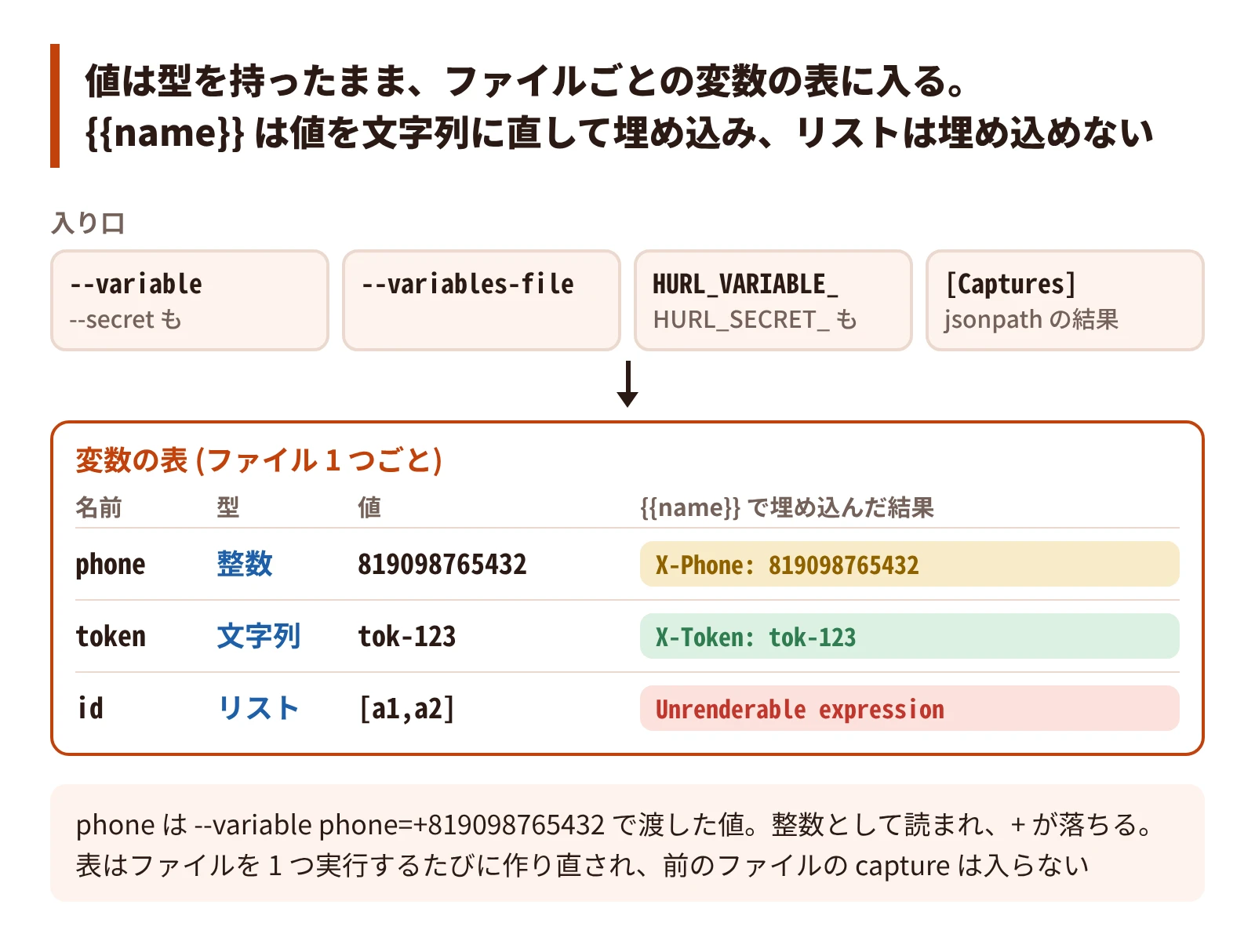
hurl の変数に値を入れる経路は 4 つある。
--variable name=value(と--secret name=value)--variables-file <file>(1 行に 1 つname=value)- 環境変数
HURL_VARIABLE_name(とHURL_SECRET_name) - ファイルの中の
[Captures]
値は文字列とは限らない。--variable の値は、数字だけなら数値として読まれる。jsonpath の結果は文字列・数値・オブジェクト・リストのどれにもなり、capture はその型のまま持つ。{{name}} は値を文字列に直して埋め込むので、書いた文字と届く文字が変わることがあり、リストは埋め込めない。
変数の表は、ファイル 1 つを実行するたびに作り直される。
以下の節は、変数が届く範囲 (ファイルと経路) と、値の型 (--variable の推論、jsonpath の件数、null) の順に扱う。
変数はファイルをまたがない
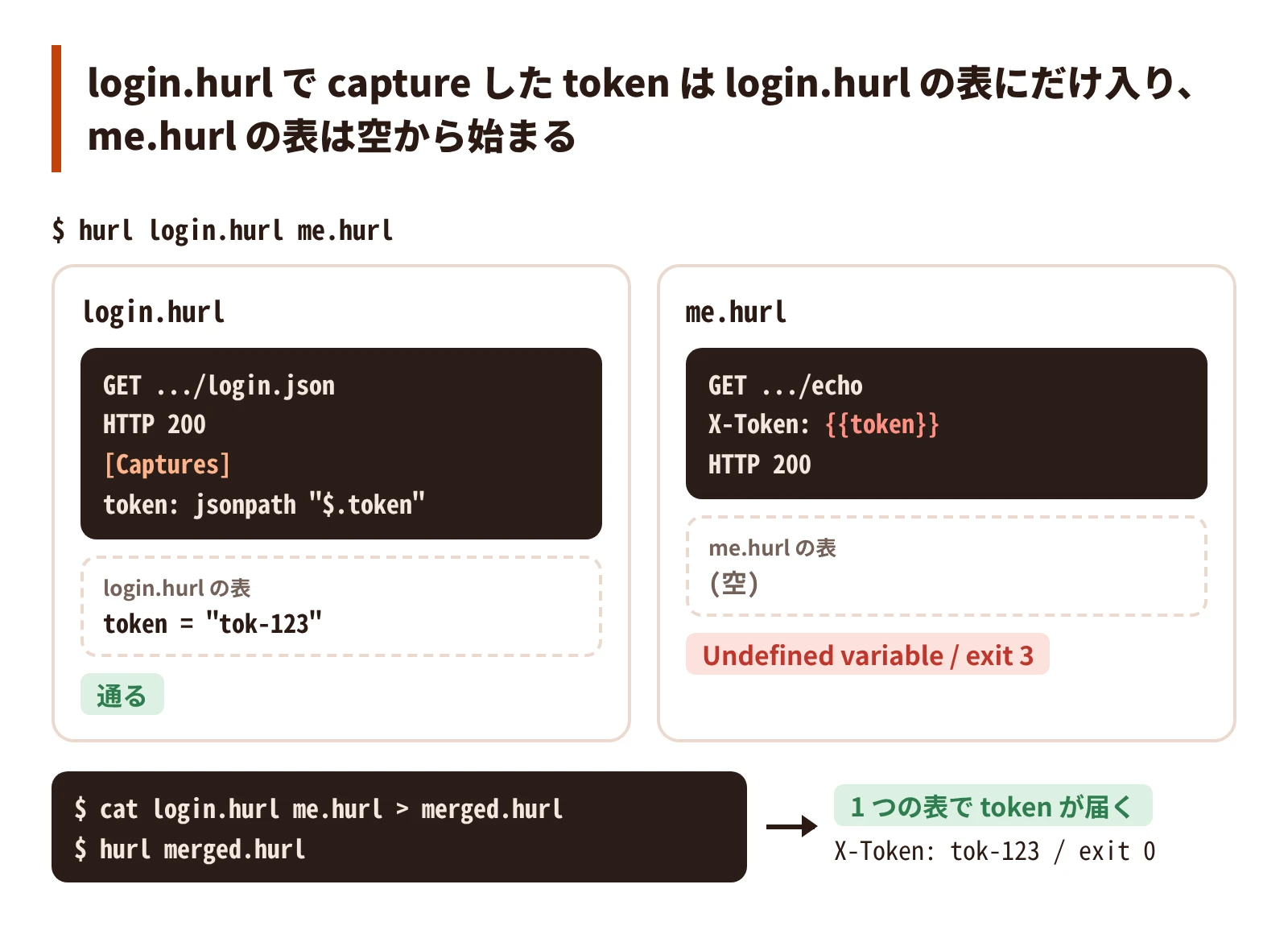
man hurl は --continue-on-error の説明で次のとおり書いている。
All the input files are executed independently. The result of one file does not affect the execution of the other Hurl files.login.hurl で capture した token を、me.hurl で使う。
GET http://127.0.0.1:8765/login.json
HTTP 200
[Captures]
token: jsonpath "$.token"GET http://127.0.0.1:8765/echo
X-Token: {{token}}
HTTP 200$ hurl login.hurl me.hurl; echo "exit=$?"
{"token":"tok-123"}
error: Undefined variable
--> me.hurl:2:12
|
| GET http://127.0.0.1:8765/echo
2 | X-Token: {{token}}
| ^^^^^ you must set the variable token
|
exit=3login.hurl は通って応答を出力し、me.hurl が Undefined variable で落ちる。2 つを 1 つのファイルに結合すると、token が届く。
$ cat login.hurl me.hurl > merged.hurl
$ hurl merged.hurl; echo "exit=$?"
{"method": "GET", "path": "/echo", "headers": {"X-Token": "tok-123"}, "body": null}
exit=0hurl のファイルには、別のファイルを読み込む構文が無い (公式の issue #317 で要望されている)。ログインのような共通の手順を使い回すなら、実行前に結合する。ファイルをまたいで値を持ち越すなら、前のファイルの capture を外に書き出し、次の実行に --variable で渡す仕組みを自分で書く。
- PITFALL:
--testを付けると、ファイルは並列に走る (man hurl: “In test mode, files are executed in parallel.")。変数だけでなく実行の順でも、ファイルの間に前後関係は作れない
--variable の値は、数字だけなら数値として読まれる
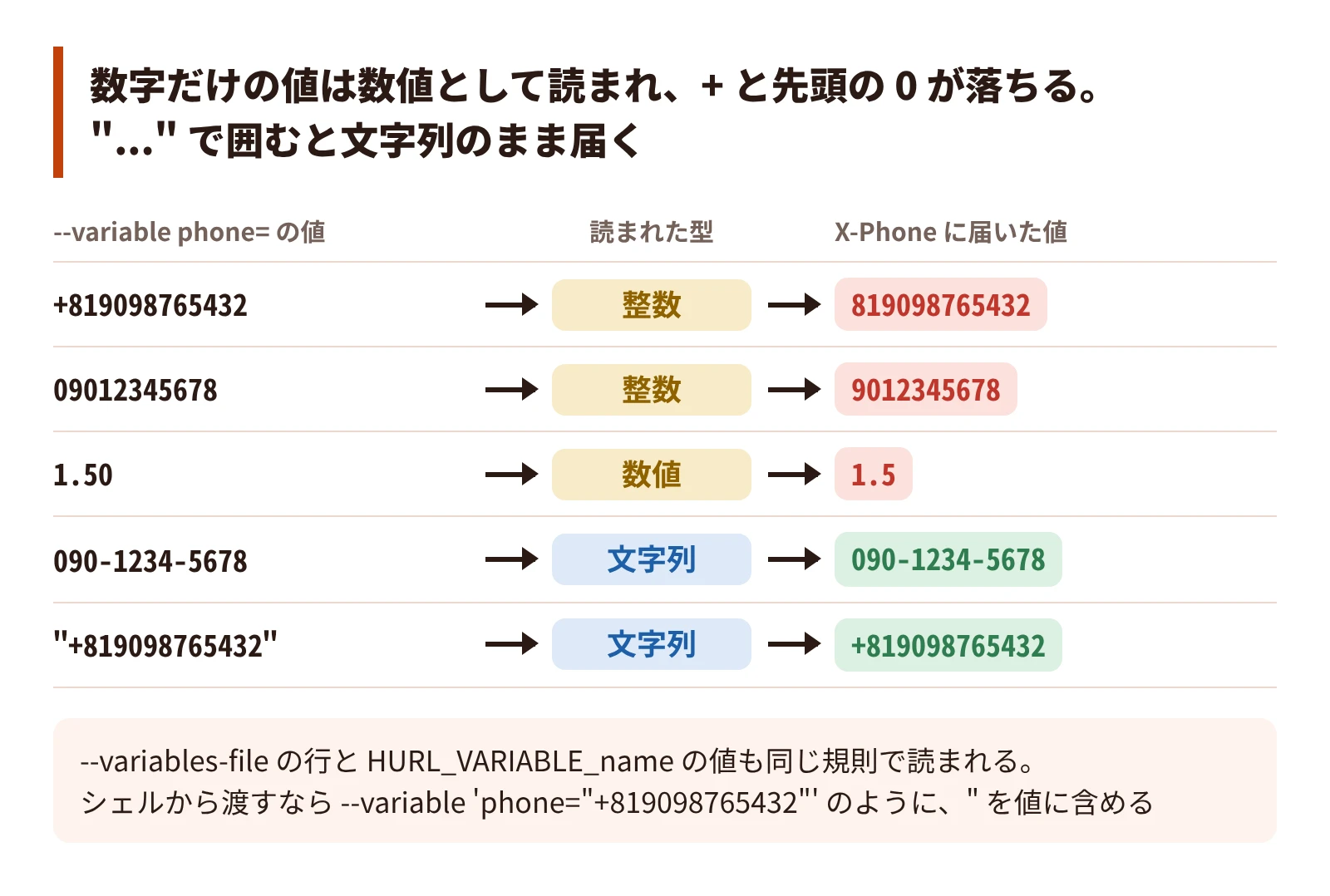
--variable name=value の value は、+ か - で始まってもよい数字だけの並び (^[+-]?\d+$) なら整数として読まれる。{{}} はその整数を文字列に直して埋め込むので、+ と先頭の 0 が落ちる。
GET http://127.0.0.1:8765/echo
X-Phone: {{phone}}
HTTP 200$ hurl --variable phone=+819098765432 phone.hurl
{"method": "GET", "path": "/echo", "headers": {"X-Phone": "819098765432"}, "body": null}
$ hurl --variable phone=09012345678 phone.hurl
{"method": "GET", "path": "/echo", "headers": {"X-Phone": "9012345678"}, "body": null}
$ hurl --variable phone=090-1234-5678 phone.hurl
{"method": "GET", "path": "/echo", "headers": {"X-Phone": "090-1234-5678"}, "body": null}ハイフンを含む値は文字列のまま届く。小数も数値として読まれ、1.50 は 1.5 になる (value.hurl は phone.hurl のヘッダを X-Value: {{v}} にしたもの)。
$ hurl --variable v=1.50 value.hurl
{"method": "GET", "path": "/echo", "headers": {"X-Value": "1.5"}, "body": null}値を "..." で囲むと文字列として読まれ、書いたとおりに届く。シェルのクォートとは別に、hurl へ渡す文字列の中に " を含める。
$ hurl --variable 'phone="+819098765432"' phone.hurl
{"method": "GET", "path": "/echo", "headers": {"X-Phone": "+819098765432"}, "body": null}
$ hurl --variable 'phone="09012345678"' phone.hurl
{"method": "GET", "path": "/echo", "headers": {"X-Phone": "09012345678"}, "body": null}
$ hurl --variable v='"1.50"' value.hurl
{"method": "GET", "path": "/echo", "headers": {"X-Value": "1.50"}, "body": null}--variables-file の行と環境変数 HURL_VARIABLE_<name> の値も、同じ規則で読まれる。
$ printf 'phone=+819098765432\n' > vars.txt
$ hurl --variables-file vars.txt phone.hurl
{"method": "GET", "path": "/echo", "headers": {"X-Phone": "819098765432"}, "body": null}
$ printf 'phone="+819098765432"\n' > vars.txt
$ hurl --variables-file vars.txt phone.hurl
{"method": "GET", "path": "/echo", "headers": {"X-Phone": "+819098765432"}, "body": null}シェルの配列で組み立てるなら、値を "..." で囲んで入れる。
args+=(--variable "${key}=\"${value}\"")- PITFALL: ハイフンを含む ID などは文字列のまま届くので、数字だけの値 (電話番号、郵便番号、先頭が 0 の ID) だけが崩れる。ログで値を伏せていると、消えた
+や0に気づけない
--variables-file は値を展開しない
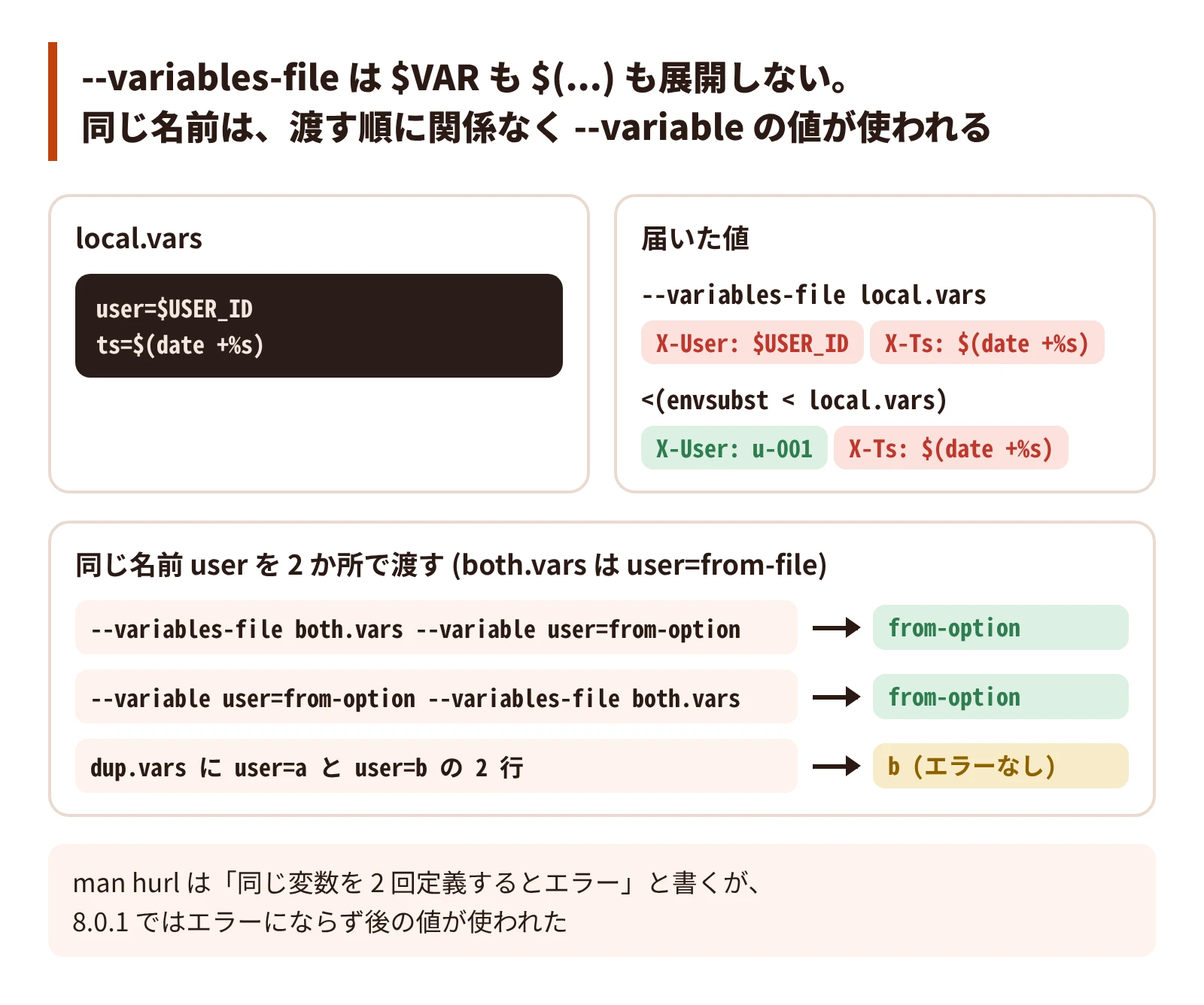
--variables-file の行は name=value の形で、value は書いた文字のまま読まれる。$VAR も $(...) も展開しない。
GET http://127.0.0.1:8765/echo
X-User: {{user}}
X-Ts: {{ts}}
HTTP 200$ cat local.vars
user=$USER_ID
ts=$(date +%s)
$ export USER_ID=u-001
$ hurl --variables-file local.vars show.hurl
{"method": "GET", "path": "/echo", "headers": {"X-User": "$USER_ID", "X-Ts": "$(date +%s)"}, "body": null}process substitution (<(...)) で展開した結果も読める。envsubst が展開するのは $VAR だけなので、$(...) は残る。
$ hurl --variables-file <(envsubst < local.vars) show.hurl
{"method": "GET", "path": "/echo", "headers": {"X-User": "u-001", "X-Ts": "$(date +%s)"}, "body": null}$(...) まで評価するなら、bash で source してから、名前ごとに間接展開 (${!k}) で値を取り出して --variable で渡す。
source local.vars
args=()
while IFS='=' read -r k _; do
args+=(--variable "$k=\"${!k}\"")
done < local.vars
hurl "${args[@]}" show.hurl{"method": "GET", "path": "/echo", "headers": {"X-User": "u-001", "X-Ts": "1792730195"}, "body": null}同じ名前を --variables-file と --variable の両方で渡すと、どちらを後に書いても --variable の値が使われる。
$ printf 'user=from-file\nts=1\n' > both.vars
$ hurl --variables-file both.vars --variable user=from-option show.hurl
{"method": "GET", "path": "/echo", "headers": {"X-User": "from-option", "X-Ts": "1"}, "body": null}
$ hurl --variable user=from-option --variables-file both.vars show.hurl
{"method": "GET", "path": "/echo", "headers": {"X-User": "from-option", "X-Ts": "1"}, "body": null}man hurl は --variables-file について “Note that defining a variable twice produces an error.” と書いている。8.0.1 では、1 つのファイルに同じ名前を 2 回書いても、--variable を 2 回渡しても、エラーにならず後の値が使われた。
$ printf 'user=a\nuser=b\nts=1\n' > dup.vars
$ hurl --variables-file dup.vars show.hurl; echo "exit=$?"
{"method": "GET", "path": "/echo", "headers": {"X-User": "b", "X-Ts": "1"}, "body": null}
exit=0
$ hurl --variable user=a --variable user=b --variable ts=1 show.hurl; echo "exit=$?"
{"method": "GET", "path": "/echo", "headers": {"X-User": "b", "X-Ts": "1"}, "body": null}
exit=0- PITFALL: 既定値を
--variableで渡し、環境ごとの値を--variables-fileで後から上書きする作りにすると、上書きは効かず既定値のまま走る
環境変数は HURL_VARIABLE_ を付けたものだけが届く
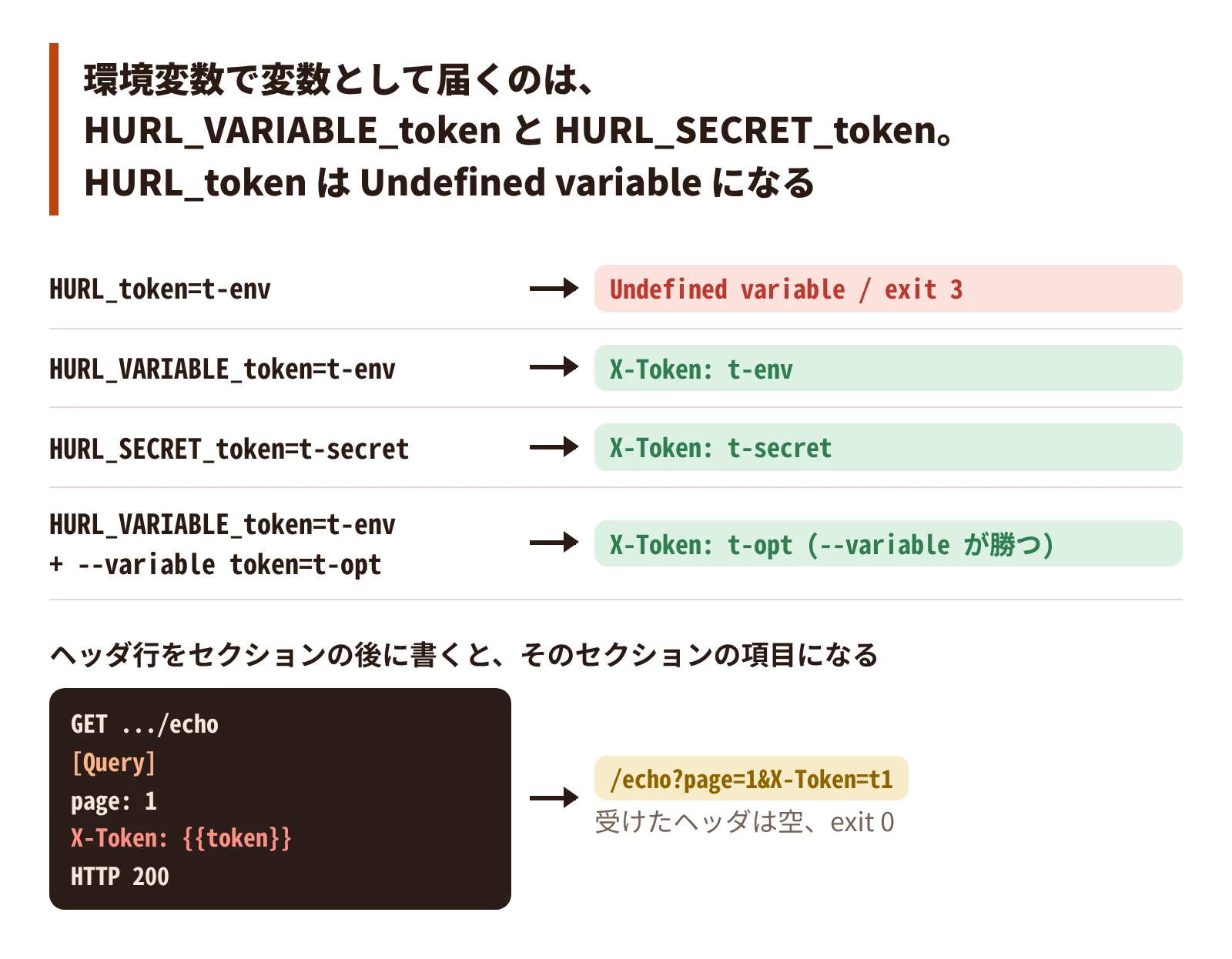
man hurl は --variable の項に “Environment variables: HURL_VARIABLE_name” と書いている。接頭辞が HURL_ だけの環境変数は、変数にならない。
GET http://127.0.0.1:8765/echo
X-Token: {{token}}
HTTP 200
$ HURL_token=t-env hurl show.hurl; echo "exit=$?"
error: Undefined variable
--> show.hurl:2:12
|
| GET http://127.0.0.1:8765/echo
2 | X-Token: {{token}}
| ^^^^^ you must set the variable token
|
exit=3
$ HURL_VARIABLE_token=t-env hurl show.hurl
{"method": "GET", "path": "/echo", "headers": {"X-Token": "t-env"}, "body": null}
$ HURL_SECRET_token=t-secret hurl show.hurl
{"method": "GET", "path": "/echo", "headers": {"X-Token": "t-secret"}, "body": null}環境変数と --variable の両方で渡すと --variable の値が使われる。HURL_VARIABLE_ の値も型が推論される。
$ HURL_VARIABLE_token=t-env hurl --variable token=t-opt show.hurl
{"method": "GET", "path": "/echo", "headers": {"X-Token": "t-opt"}, "body": null}
$ HURL_VARIABLE_token=+81901 hurl show.hurl
{"method": "GET", "path": "/echo", "headers": {"X-Token": "81901"}, "body": null}
ファイルで使わない変数を渡しても、エラーも警告も出ない。名前を打ち間違えても、ファイル側がその変数を使っていなければ検知されない。
$ hurl --variable token=t1 --variable tokn=t2 show.hurl; echo "exit=$?"
{"method": "GET", "path": "/echo", "headers": {"X-Token": "t1"}, "body": null}
exit=0
全部の変数をどのファイルにも渡す作りにしてよい。ログに出す変数をファイルが使うものに絞るなら、ファイルから {{name}} の名前を抜き出す。
$ grep -oE '\{\{[[:space:]]*[a-zA-Z_][a-zA-Z0-9_]*' show.hurl | sed -E 's/^\{\{[[:space:]]*//' | sort -u
token外から渡したトークンをヘッダに書くときは、ヘッダ行をリクエスト行の直後、[Query] などのセクションより前に置く。セクションの後に書いた name: value の行は、エラーにならずそのセクションの項目として読まれる。
GET http://127.0.0.1:8765/echo
[Query]
page: 1
X-Token: {{token}}
HTTP 200
$ hurl --variable token=t1 header-after-section.hurl; echo "exit=$?"
{"method": "GET", "path": "/echo?page=1&X-Token=t1", "headers": {}, "body": null}
exit=0- PITFALL: トークンがヘッダではなくクエリ文字列で送られる。サーバがそのヘッダを必須にしていなければ 200 が返り、テストは通る。assert をわざと壊して落ちることを確かめ、その要求が検査されているかを見る
jsonpath の結果は件数で型が変わる
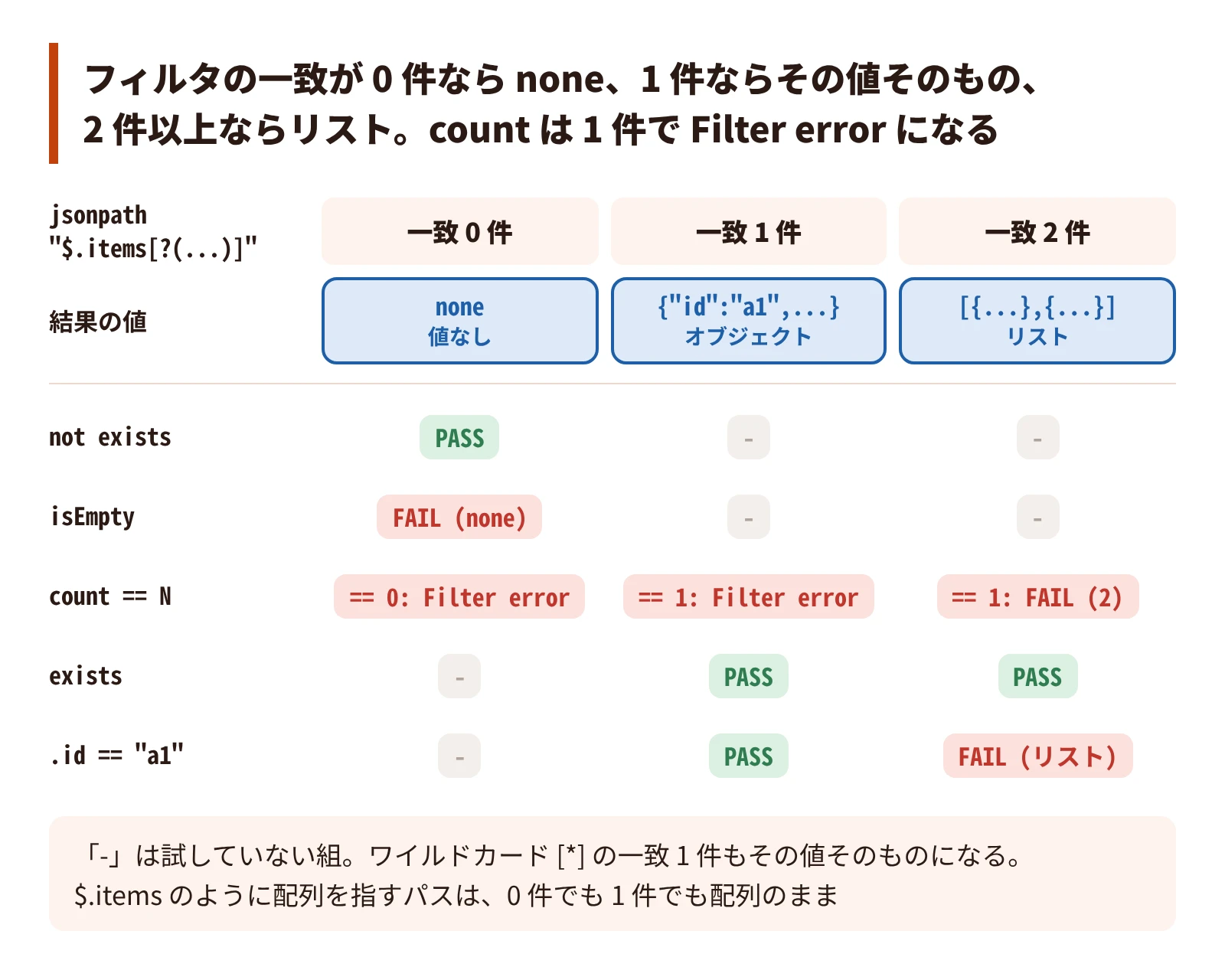
hurl 8.0.1 の jsonpath は、フィルタ ([?(...)]) の一致が 0 件なら値なし (none)、1 件ならその値そのもの、2 件以上ならリストを返す。count の入力はリストなど (エラーの文言では list, bytes or nodeset) に限られるので、1 件のときは型のエラーで落ちる。
応答の JSON と assert 1 行の組を並べて走らせた (FAIL の下は、hurl のエラーから actual などの行を抜き出したもの)。
{"items":[{"id":1}]}  jsonpath "$.items[?(@.id==2)]" not exists      PASS
{"items":[{"id":1}]}  jsonpath "$.items[?(@.id==2)]" isEmpty         FAIL
    error: Assert failure
    actual:   none
    expected: empty
{"items":[{"id":1}]}  jsonpath "$.items[?(@.id==2)]" count == 0      FAIL
    error: Filter error
    missing value to apply filter
{"items":[{"id":1}]}  jsonpath "$.items[?(@.id==1)].id" == 1         PASS
{"items":[{"id":1}]}  jsonpath "$.items[?(@.id==1)]" count == 1      FAIL
    error: Filter error
    invalid filter input type
    actual:   object
    expected: list, bytes or nodeset
ワイルドカード ([*]) の一致が 1 件のときも、その値そのものになる。配列を指すパス ($.items) は、要素が 0 件でも 1 件でも配列のまま。
{"items":[{"id":1}]}  jsonpath "$.items[*].id" count == 1            FAIL
    error: Filter error
    invalid filter input type
    actual:   integer
    expected: list, bytes or nodeset
{"items":[{"id":1}]}  jsonpath "$.items[*].id" == 1                  PASS
{"items":[]}          jsonpath "$.items" isEmpty                     PASS
{"items":[]}          jsonpath "$.items" count == 0                  PASS
{"items":[{"id":1}]}  jsonpath "$.items" count == 1                  PASS
「条件に合う要素が 1 件ある」を、cash が 1 件の応答と 2 件の応答で比べる。
items-1.json: {"items":[{"id":"a1","type":"cash"},{"id":"c1","type":"card"}]}
items-2.json: {"items":[{"id":"a1","type":"cash"},{"id":"a2","type":"cash"}]}| assert | cash 1 件 | cash 2 件 |
|---|---|---|
jsonpath "$.items[?(@.type=='cash')]" count == 1 | Filter error (actual: object) | FAIL (actual: integer <2>) |
jsonpath "$.items[?(@.type=='cash')]" exists | PASS | PASS |
jsonpath "$.items[?(@.type=='cash')].id" == "a1" | PASS | FAIL (actual: list <[a1,a2]>) |
count == 1 はどちらの件数でも通らない。exists は 2 件でも通る。「1 件だけ」を確かめるなら、値そのものを比べる。
日報によると、7.x では一致が 1 件でもリストのまま返り、8.0.1 へ上げたときに count == 1 と nth 0 が型のエラーで落ちた (7.x は手元で確かめていない)。
- PITFALL: 0 件を
isEmptyやcount == 0で確かめると落ちる。消えたことを確かめるならnot existsを使う - PITFALL: CI とローカルで hurl の版が違うと、同じ assert が片方だけで落ちる。版を揃える
capture は件数で後続の要求を壊す
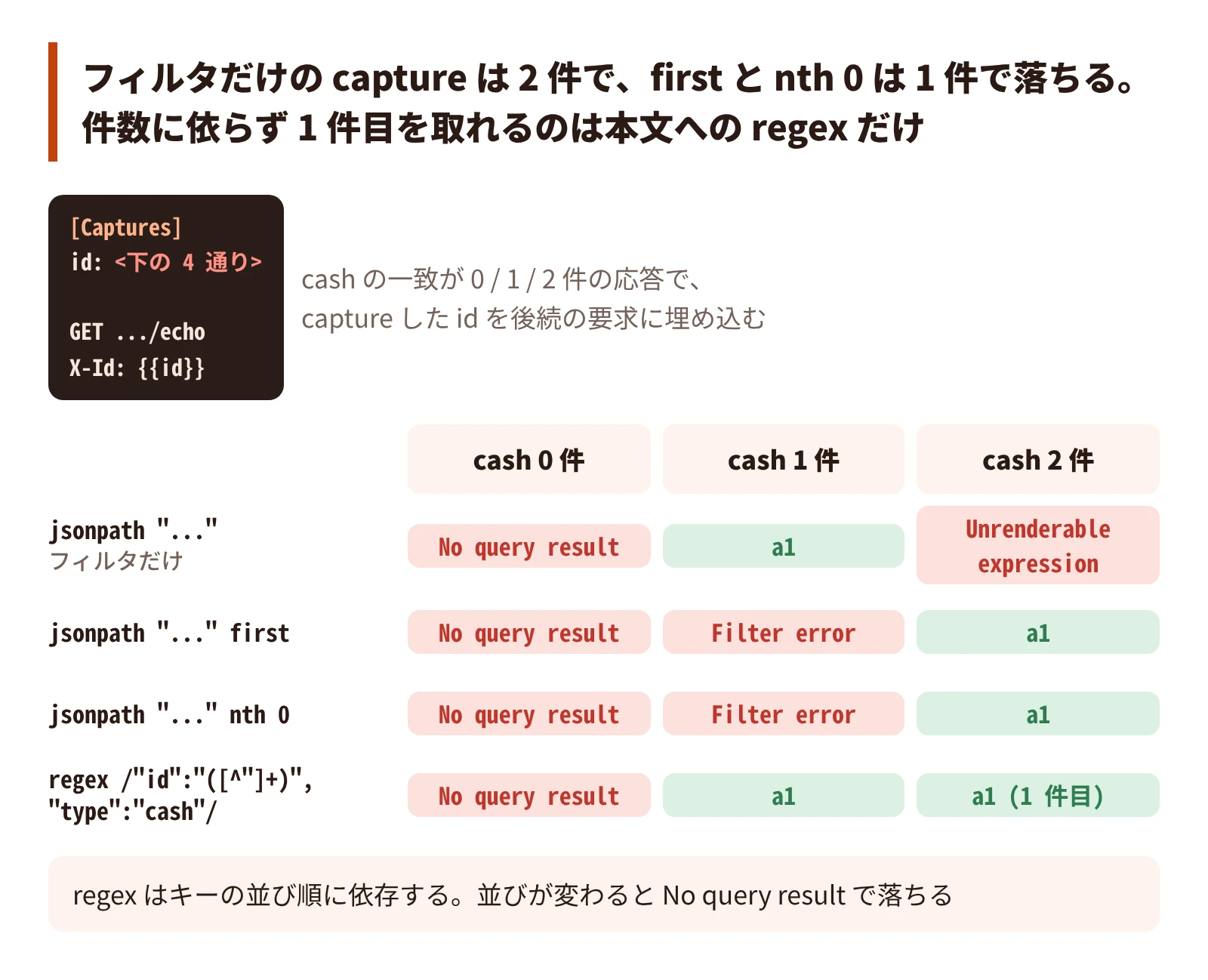
一覧から条件に合う 1 件の ID を取り出し、後続の要求へ渡す。
GET http://127.0.0.1:8765/items-{{n}}.json
HTTP 200
[Captures]
id: jsonpath "$.items[?(@.type=='cash')].id"

GET http://127.0.0.1:8765/echo
X-Id: {{id}}
HTTP 200
capture の行だけを替えた 4 通りを、cash が 0 / 1 / 2 件の応答で走らせた (0 件は 4 通りとも plain と同じ No query result なので、plain 以外は省いた)。
id: jsonpath "$.items[?(@.type=='cash')].id"            # plain
id: jsonpath "$.items[?(@.type=='cash')].id" first      # first
id: jsonpath "$.items[?(@.type=='cash')].id" nth 0      # nth
id: regex /"id":"([^"]+)","type":"cash"/                # regex
plain n=0: exit=3
error: No query result
query didn't return any result
plain n=1: OK {"method": "GET", "path": "/echo", "headers": {"X-Id": "a1"}, "body": null}
plain n=2: exit=3
error: Unrenderable expression
expression with value [a1,a2] can not be rendered
first n=1: exit=3
error: Filter error
invalid filter input type
actual: string
expected: list
first n=2: OK {"method": "GET", "path": "/echo", "headers": {"X-Id": "a1"}, "body": null}
nth n=1: exit=3
error: Filter error
invalid filter input type
actual: string
expected: list
nth n=2: OK {"method": "GET", "path": "/echo", "headers": {"X-Id": "a1"}, "body": null}
regex n=1: OK {"method": "GET", "path": "/echo", "headers": {"X-Id": "a1"}, "body": null}
regex n=2: OK {"method": "GET", "path": "/echo", "headers": {"X-Id": "a1"}, "body": null}| capture | 0 件 | 1 件 | 2 件 |
|---|---|---|---|
| jsonpath (フィルタだけ) | No query result | a1 | Unrenderable expression |
jsonpath + first | No query result | Filter error | a1 |
jsonpath + nth 0 | No query result | Filter error | a1 |
本文への regex | No query result | a1 | a1 (1 件目) |
フィルタだけの capture は 1 件でしか動かず、first と nth 0 は 2 件以上でしか動かない。件数に依らず 1 件目を取れるのは、応答の本文に regex を当てる形だけだった。
- PITFALL: 2 件で落ちたテストに
firstを足すと、データが 1 件に戻ったときに逆向きに落ちる。テストデータの件数が揺れるたびに、どちらかの向きで落ち続ける - PITFALL:
regexはキーの並び順に依存する。応答の直列化の順を決めている型が変わると、capture がNo query resultで落ちる。並び順を決めている型定義の場所を、コメントに残す
null とキーが無いのは別の状態
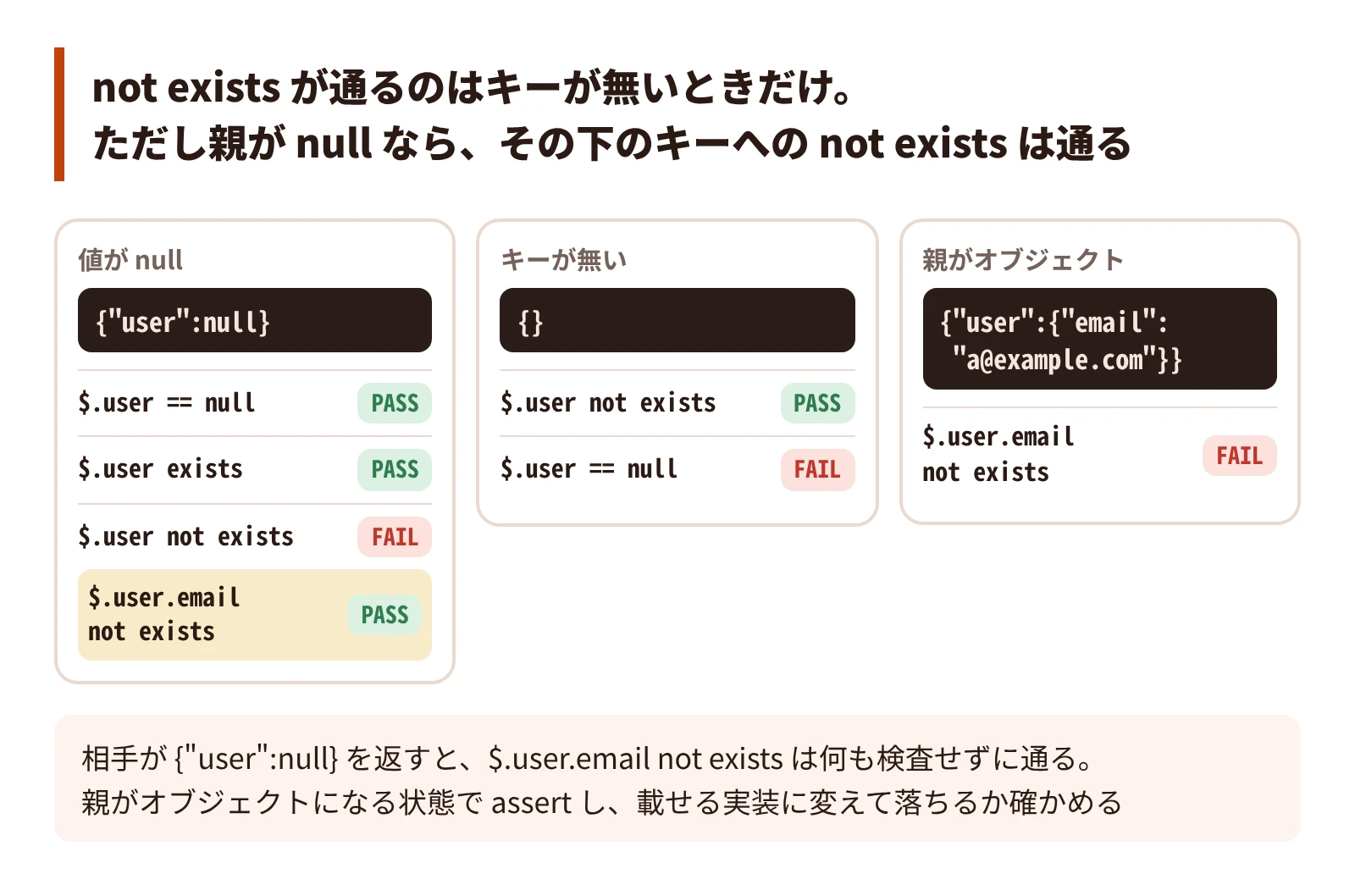
hurl はキーが無いこと (none) と、値が null であることを区別する。
{"user":null}                      jsonpath "$.user" == null            PASS
{"user":null}                      jsonpath "$.user" exists             PASS
{"user":null}                      jsonpath "$.user" not exists         FAIL
    error: Assert failure
    actual:   null <null>
    expected: not something
{}                                 jsonpath "$.user" not exists         PASS
{}                                 jsonpath "$.user" == null            FAIL
    error: Assert failure
    actual:   none
    expected: null
親が null なら、その下のパスは解決しないので、not exists が通る。親がオブジェクトなら、同じ assert が値を見て落ちる。
{"user":null}                      jsonpath "$.user.email" not exists   PASS
{"user":{"email":"a@example.com"}} jsonpath "$.user.email" not exists   FAIL
    error: Assert failure
    actual:   string <a@example.com>
    expected: not something
isNull という述語は無く、構文エラーになる。null は == null で比べる。
{"user":null}                      jsonpath "$.user" isNull             FAIL
    error: Parsing predicate
    expecting a predicate
capture が値を取れないときは、その手順が capture の行で落ち、同じ手順の [Asserts] は評価されない。
GET http://127.0.0.1:8765/user-null.json
HTTP 200
[Captures]
email: jsonpath "$.user.email"
[Asserts]
jsonpath "$.user.email" == "never@example.com"
$ hurl --no-output capture.hurl; echo "exit=$?"
error: No query result
--> capture.hurl:4:8
|
| GET http://127.0.0.1:8765/user-null.json
| ...
4 | email: jsonpath "$.user.email"
| ^^^^^^^^^^^^^^^^^^^^^^^ query didn't return any result
|
exit=3落ちるはずの assert (== "never@example.com") の失敗は出ず、capture の失敗だけが出る。
- PITFALL: 「
user.emailが応答に載っていないこと」をjsonpath "$.user.email" not existsで確かめても、相手が{"user": null}を返すと、その assert は何も検査していない。Go でomitemptyの無い nil ポインタを返すとnullになる ( Go の JSON が警告なしに潰す null と欠落 )。親がオブジェクトになる状態を作ってから assert し、載せる実装に変えて落ちるかを確かめる - PITFALL: capture と同じパスに
existsの assert を書いても、capture が先に落ちるので、その assert は評価されない - PITFALL:
not existsを書く前に、実際の応答でキーが無いのかnullなのかを確かめる。nullを返す API へのnot existsは落ちる
まとめ
| 場面 | 起きること | 対策 |
|---|---|---|
| 複数ファイル | 変数はファイルごとに作り直され、capture は次のファイルに届かない | 共通の手順は結合して 1 ファイルにする。持ち越す値は --variable で渡す |
--variable の値 | 数字だけの値は数値になり、+ と先頭の 0 が落ち、1.50 は 1.5 | 値を "..." で囲む |
--variables-file | $VAR も $(...) も展開しない。同じ名前は --variable が勝つ | bash で source して --variable で渡す。上書きを --variables-file に頼らない |
| 環境変数 | HURL_<name> は届かない | HURL_VARIABLE_<name> を使う |
| 使わない変数 | エラーも警告も出ない | 全部渡してよい。ログはファイルの {{name}} を grep して絞る |
| ヘッダ行の位置 | セクションの後に書くと、そのセクションの項目になる | ヘッダはリクエスト行の直後に書く |
| jsonpath の件数 | 0 件は none、1 件はその値、2 件以上はリスト。1 件の count は Filter error | 0 件は not exists、1 件は値を比べる |
| capture の件数 | フィルタだけは 2 件で、first / nth 0 は 1 件で落ちる | 件数が揺れるなら本文への regex で取る |
null とキー無し | not exists はキーが無いときだけ通る。親が null ならその下は通る | 親がオブジェクトの状態で assert し、反転させて落ちるか確かめる |
参考
- Hurl
- Hurl Manual: –variable
- Orange-OpenSource/hurl
man hurl(hurl 8.0.1)