結論
- linked worktree は、object・ブランチ (
refs/heads/) とその reflog・.git/configを本体と共有する。HEAD とその reflog・index・作業ツリーは worktree ごとに持つ - 本体か worktree かは、
--git-dirと--git-common-dirを--path-format=absoluteで絶対パスに揃えて比べる。揃えずに比べると、本体のサブディレクトリで worktree と判定される - 1 つのブランチは 1 つの worktree でしか checkout できず、
git worktree list --porcelainの先頭は本体になる。ブランチ名から worktree を引くと、本体のパスが返ることがある - 新しい worktree に入るのは追跡中のファイルだけ。ignored の
.envやnode_modulesは無く、パスに紐づく仕組み (node のモジュール解決、direnv の許可) も本体とは別の場所として扱う - worktree で作ったコミットは、worktree とブランチを消すと reflog からも消える。gc の前なら
git fsck --lost-foundで拾える
以下は git 2.56.0 / GNU bash 5.3.20 / Linux x86_64 で実測した。出力の <root> は再現に使った一時ディレクトリで、コマンドのパスは <root> からの相対に縮めて書いた。
前提: worktree の .git は、本体の .git/worktrees/<名前> を指すファイル
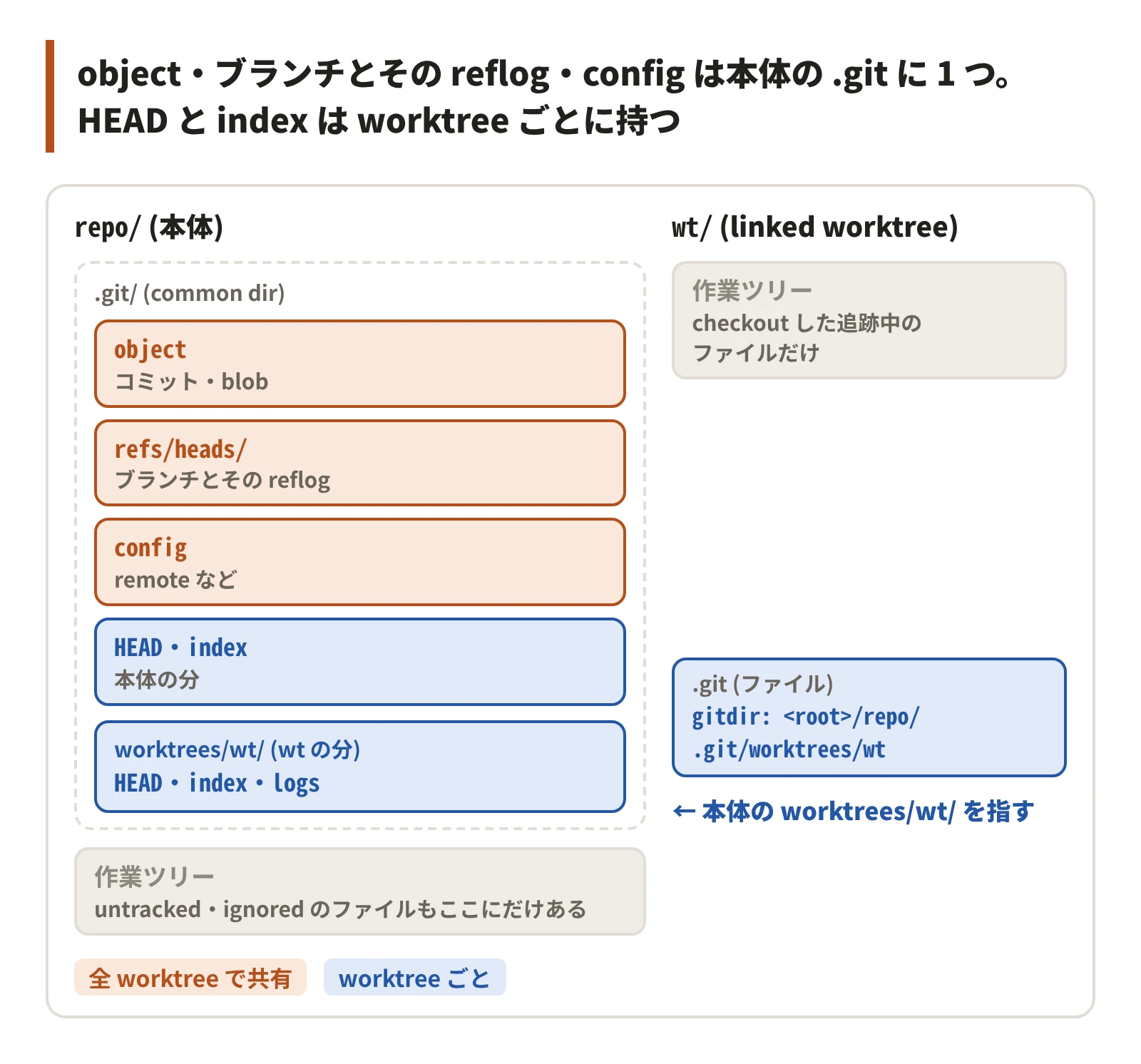
git worktree add で作った linked worktree の .git はディレクトリではなく、1 行のファイルになる。
$ git -C repo worktree add -q ../wt -b feat
$ cat wt/.git
gitdir: <root>/repo/.git/worktrees/wt
$ ls repo/.git/worktrees/wt
HEAD
ORIG_HEAD
commondir
gitdir
index
logs
refs
reflog は、ブランチや HEAD が指すコミットが変わるたびに、前の位置を 1 行ずつ残す手元の記録 (git reflog で読む) で、ブランチごと・HEAD ごとに 1 本ある。
.git/worktrees/wt/ に、その worktree の HEAD・index・HEAD の reflog (logs) が入る。object・refs/heads/ のブランチ・.git/config は本体の .git (common dir) にあり、全 worktree が同じものを読み書きする。
git-worktree(1) の REFS の節も、HEAD などの疑似 ref は worktree ごと、refs/ の下の ref は共有と書いている。
本体の .git で共有 | worktree ごと |
|---|---|
| object (コミット・blob) | HEAD と HEAD の reflog |
ブランチ (refs/heads/) とその reflog | index |
.git/config (remote など) | 作業ツリー (checkout した追跡中のファイル) |
以下の罠は、どれも「共有されると思ったものが分かれている」か「分かれると思ったものが共有されている」のずれから起きる。
本体か worktree かは、2 つのパスを絶対パスに揃えて比べる
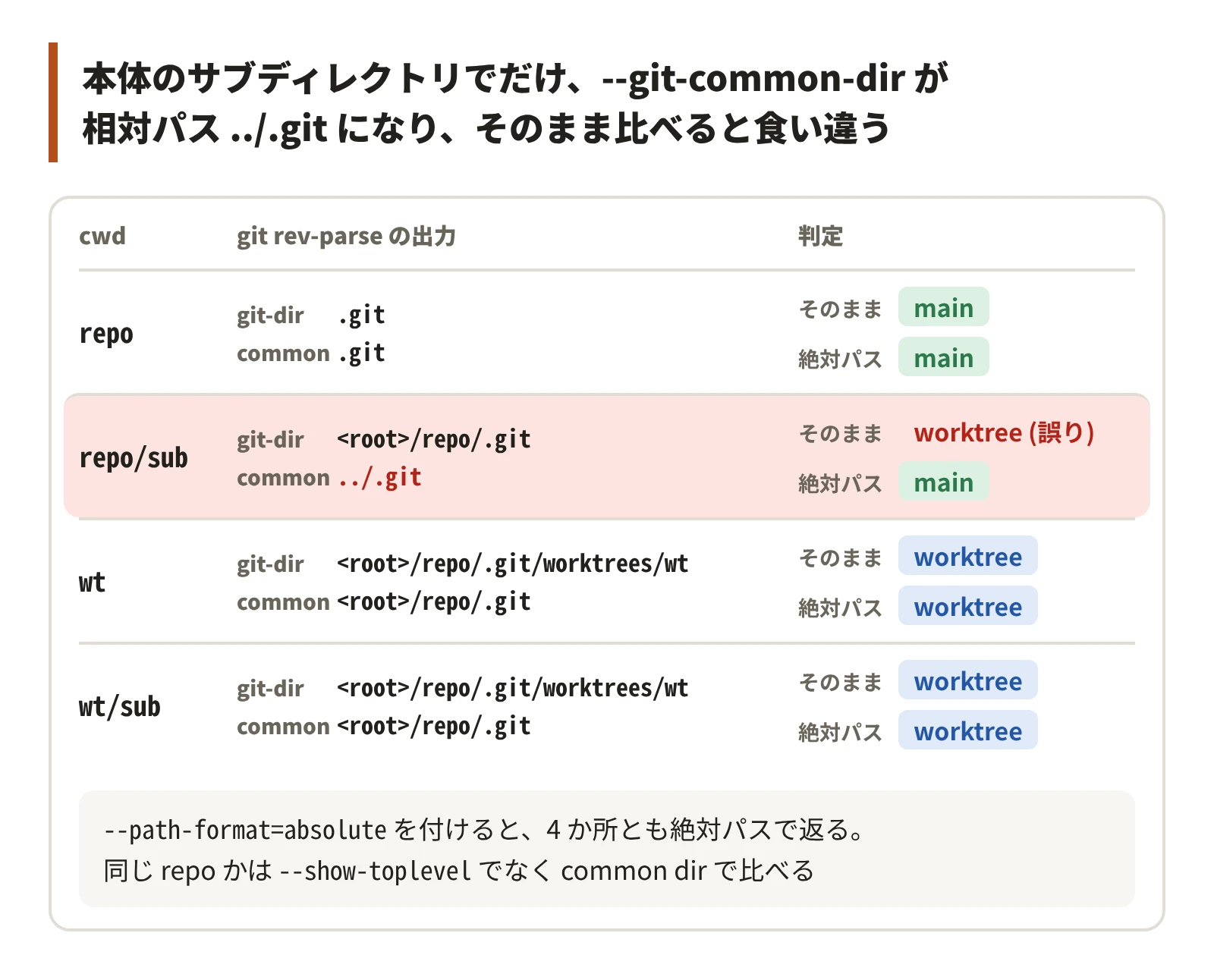
linked worktree では、--git-dir が .git/worktrees/<名前>、--git-common-dir が本体の .git を指すので、2 つが食い違う。本体では 2 つが一致する。
ただし、出力が相対パスか絶対パスかは呼んだ場所で変わる。
for d in repo repo/sub wt wt/sub; do
  (cd "$root/$d" && echo "--- cwd=$d" && git rev-parse --git-dir --git-common-dir)
done
--- cwd=repo
.git
.git
--- cwd=repo/sub
<root>/repo/.git
../.git
--- cwd=wt
<root>/repo/.git/worktrees/wt
<root>/repo/.git
--- cwd=wt/sub
<root>/repo/.git/worktrees/wt
<root>/repo/.git本体のサブディレクトリでは、--git-dir は絶対パス、--git-common-dir は ../.git になる。この 2 つをそのまま文字列で比べると、本体のサブディレクトリだけ worktree と判定される。
--path-format=absolute を付けると、どこで呼んでも絶対パスになる。
naive() {
  [ "$(git rev-parse --git-dir)" = "$(git rev-parse --git-common-dir)" ] && echo main || echo worktree
}
absolute() {
  [ "$(git rev-parse --path-format=absolute --git-dir)" = \
    "$(git rev-parse --path-format=absolute --git-common-dir)" ] && echo main || echo worktree
}
repo naive=main absolute=main
repo/sub naive=worktree absolute=main
wt naive=worktree absolute=worktree
wt/sub naive=worktree absolute=worktreegit rev-parse --absolute-git-dir も --path-format=absolute --git-dir と同じ値を返す。
「同じ repo か」を決めるときも common dir を比べる。--show-toplevel は本体で <root>/repo、worktree で <root>/wt を返し、worktree ごとに違う。
toplevel の前方一致で「repo の中か」を決める仕組みは、worktree の中から本体の checkout を別の repo と取り違える。
common dir から /.git を外すと、本体の checkout のルートになる。worktree をまたいで共有したい物の置き場を引くのに使える。
ただし、そのディレクトリで git を打つと、相手は本体の HEAD になる。
cd "$root/wt/sub"
common=$(git rev-parse --path-format=absolute --git-common-dir)
echo "${common%/.git}"
git -C "${common%/.git}" branch --show-current
git branch --show-current
<root>/repo
main
feat- PITFALL: git の管理外で呼ぶと、
git rev-parseは stdout を空にして 128 で終わる。dirname ""は.を返すので、そのままdirnameに流すと cwd を repo のルートと取り違える。終了コードを見てから使う
v=$(git rev-parse --git-common-dir 2>/dev/null); echo "rc=$? v=[$v] dirname=[$(dirname "$v")]"rc=128 v=[] dirname=[.]git worktree list --porcelain の先頭は本体
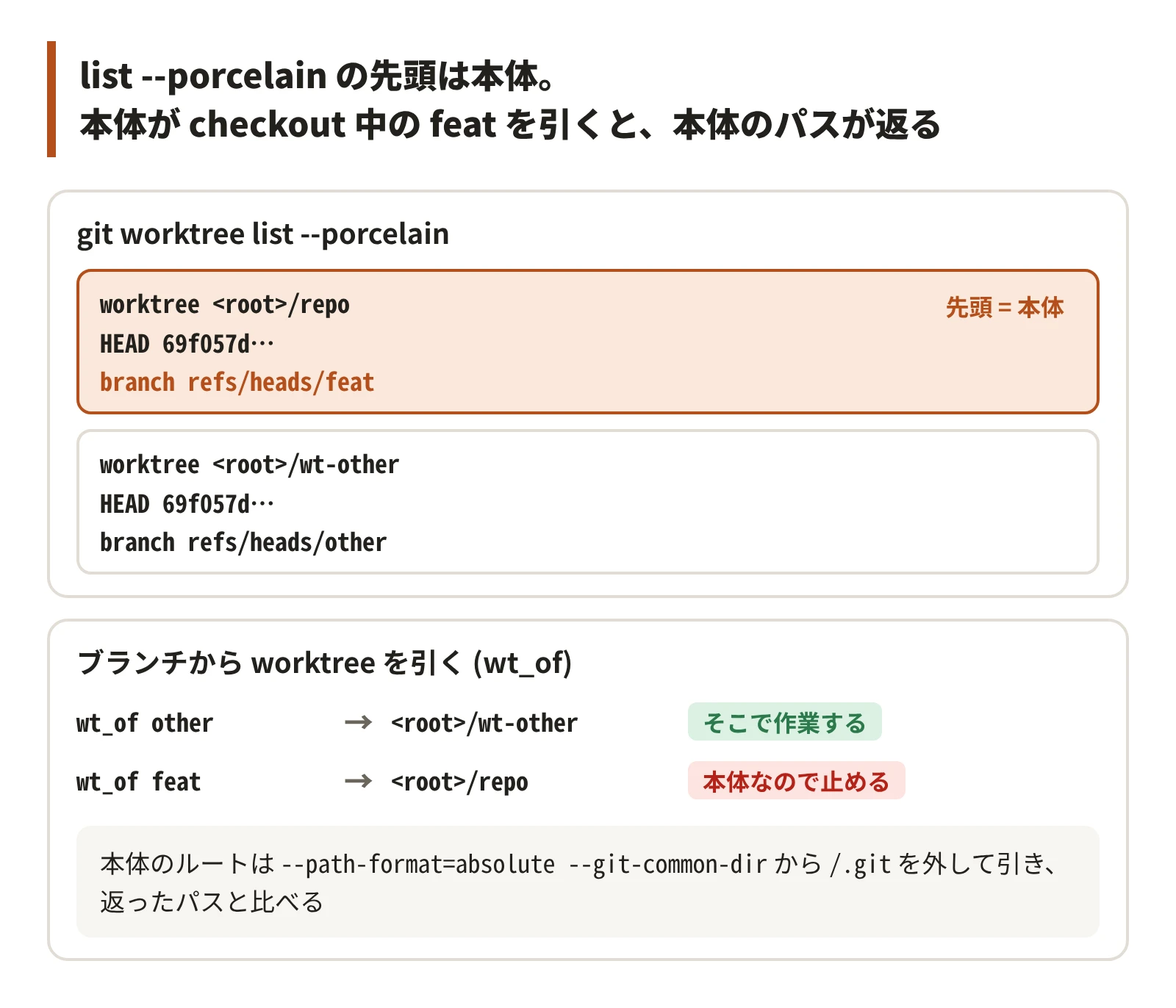
本体も worktree の 1 つとして一覧に出る。本体で feat を checkout していれば、先頭のエントリが branch refs/heads/feat を持つ。
$ git switch -q -c feat
$ git worktree add -q ../wt-other -b other
$ git worktree list --porcelain
worktree <root>/repo
HEAD 69f057d8d8cb2501ad38e892e9c0c19cd3fefcfd
branch refs/heads/feat

worktree <root>/wt-other
HEAD 69f057d8d8cb2501ad38e892e9c0c19cd3fefcfd
branch refs/heads/other
「このブランチの worktree はどこか」を一覧から引くと、feat では本体のパスが返る。
wt_of() {
  git worktree list --porcelain |
    awk -v b="refs/heads/$1" '/^worktree /{p=substr($0, 10)} $0 == "branch " b {print p}'
}
wt_of other   # => <root>/wt-other
wt_of feat    # => <root>/repo
返ったパスが本体のルートなら止める。本体のルートは前節の common dir から引ける。
common=$(git rev-parse --path-format=absolute --git-common-dir)
main_root=${common%/.git}
for b in other feat; do
  p=$(wt_of "$b")
  if [ "$p" = "$main_root" ]; then echo "$b: 本体で checkout 中なので止める"; else echo "$b: $p で作業する"; fi
done
other: <root>/wt-other で作業する
feat: 本体で checkout 中なので止める- PITFALL: 「既存の worktree があればそこを使う」ツールは、本体がそのブランチにいると本体のパスを既存の worktree として返し、本体の作業ツリーで作業を始める
git worktree add <path> <branch> は、リモートのブランチを upstream にしたローカルブランチを作る
remote-tracking branch は、git fetch がリモートのブランチを手元に写した ref で、origin/feature/x のように <remote>/<branch> の名前を持つ。upstream は、ローカルブランチに設定する「対応するリモートのブランチ」で、git pull / git push の既定の相手になる。
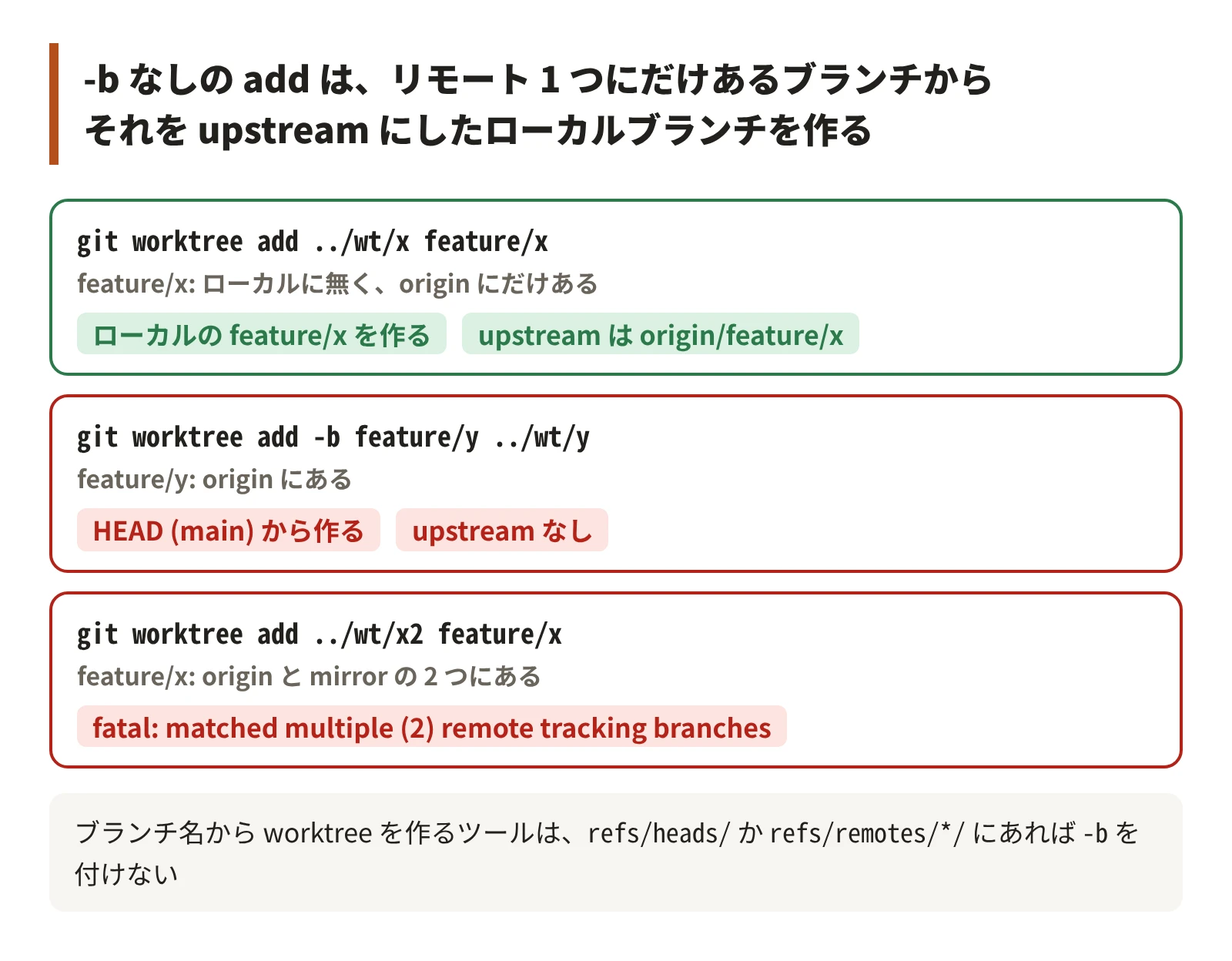
ローカルに <branch> が無く、同じ名前の remote-tracking branch がちょうど 1 つのリモートにある (origin/feature/x だけがある) と、git worktree add はそこから同じ名前のローカルブランチ feature/x を作り、origin/feature/x を upstream に設定する。
これは git switch <branch> の guess (--guess、既定で有効) と同じ動きで、git-worktree(1) は git worktree add --track -b <branch> <path> <remote>/<branch> と同じと書いている。
$ git branch -a
* main
  remotes/origin/HEAD -> origin/main
  remotes/origin/feature/x
  remotes/origin/feature/y
  remotes/origin/feature/z
  remotes/origin/main
$ git worktree add ../wt/x feature/x
Preparing worktree (new branch 'feature/x')
branch 'feature/x' set up to track 'origin/feature/x'.
HEAD is now at 10415fd remote work on feature/x
$ git -C ../wt/x rev-parse --abbrev-ref '@{u}'
origin/feature/x
-b を付けると guess は働かない。リモートに feature/y があっても、HEAD (ここでは main) から新しいブランチを作り、upstream も付かない。
$ git worktree add -b feature/y ../wt/y
Preparing worktree (new branch 'feature/y')
HEAD is now at 69f057d init
$ git -C ../wt/y rev-parse --abbrev-ref '@{u}'
fatal: no upstream configured for branch 'feature/y'
同じ名前のブランチが 2 つのリモートにあると、どちらとも決めずに 128 で失敗する。
$ git branch -r --list '*/feature/x'
  mirror/feature/x
  origin/feature/x
$ git worktree add ../wt/x2 feature/x
hint: Branch name 'feature/x' appears in multiple remotes:
...
fatal: 'feature/x' matched multiple (2) remote tracking branches
ブランチ名から worktree を用意するツールは、ローカルかリモートにあれば -b を付けず、どちらにも無いときだけ -b を付ける。
add_wt() {
  local b=$1 dir=$2
  if git rev-parse --verify --quiet "refs/heads/$b" >/dev/null ||
    [[ -n $(git for-each-ref --format='%(refname)' "refs/remotes/*/$b") ]]; then
    git worktree add -q "$dir" "$b"
  else
    git worktree add -q -b "$b" "$dir"
  fi
}
$ add_wt feature/z ../wt/z # リモートにだけある
7ebe70c remote work on feature/z (upstream origin/feature/z)
$ add_wt feature/new ../wt/new # どこにも無い
69f057d init (upstream なし)- PITFALL: 存在確認を
refs/headsだけで行うと、リモートにあるブランチでも-bの側へ進み、リモートの作業を持たないブランチができる。upstream も設定されない
1 つのブランチは 1 つの worktree でしか checkout できない
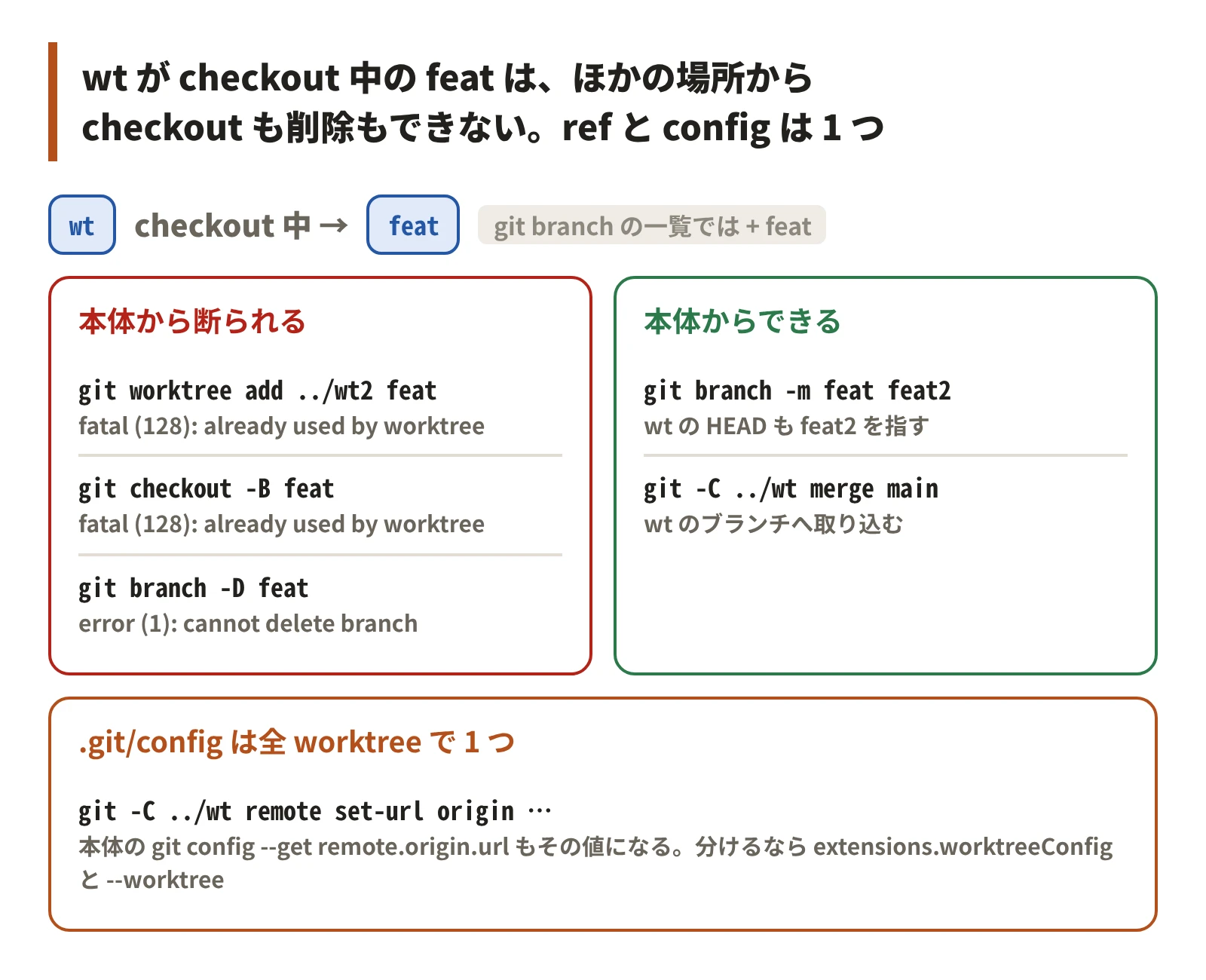
ブランチの checkout は worktree の間で排他になる。wt が feat を checkout している間、ほかの場所から feat を checkout することも消すこともできない。git branch の一覧では、別の worktree が checkout 中のブランチに + が付く。
$ git worktree add ../wt2 feat
Preparing worktree (checking out 'feat')
fatal: 'feat' is already used by worktree at '<root>/wt'
$ git checkout -B feat
fatal: 'feat' is already used by worktree at '<root>/wt'
$ git branch -D feat
error: cannot delete branch 'feat' used by worktree at '<root>/wt'
$ git branch
+ feat
* main
一方、ブランチの ref はリポジトリで 1 つなので、本体から wt のブランチを改名でき、wt の HEAD も新しい名前を指す。git -C <wt> merge で wt のブランチへ取り込むこともできる。
$ git branch -m feat feat2
$ git -C ../wt branch --show-current
feat2
$ git -C ../wt merge -q --ff-only main
$ git -C ../wt log --oneline -1
cb092b4 main: work
.git/config も全 worktree で 1 つ。wt で足した remote や set-url は、本体からもその場で同じ値に見える。
$ git -C ../wt remote add origin https://example.com/a.git
$ git config --get remote.origin.url
https://example.com/a.git
$ git -C ../wt remote set-url origin https://example.com/b.git
$ git config --get remote.origin.url
https://example.com/b.git
worktree ごとに設定を分けたいときは、extensions.worktreeConfig を有効にして git config --worktree で書く。
$ git config extensions.worktreeConfig true
$ git -C ../wt config --worktree core.editor nano
$ git -C ../wt config --get core.editor
nano
$ git config --get core.editor
$ echo $?
1
- PITFALL: worktree のディレクトリを
rm -rfで消すと、登録が残る。同じパスへのgit worktree addは fatal になるので、git worktree pruneで登録を消す
$ rm -rf ../wt
$ git worktree list
<root>/repo cb092b4 [main]
<root>/wt   cb092b4 [feat2] prunable
$ git worktree add ../wt feat2
Preparing worktree (checking out 'feat2')
fatal: '<root>/wt' is a missing but already registered worktree;
use 'add -f' to override, or 'prune' or 'remove' to clear
$ git worktree prune -v
Removing worktrees/wt: gitdir file points to non-existent location
一覧の prunable は、ディレクトリが無くなっていて git worktree prune で消せる登録に付く印。
ブランチの reflog は共有され、HEAD の reflog は worktree ごと
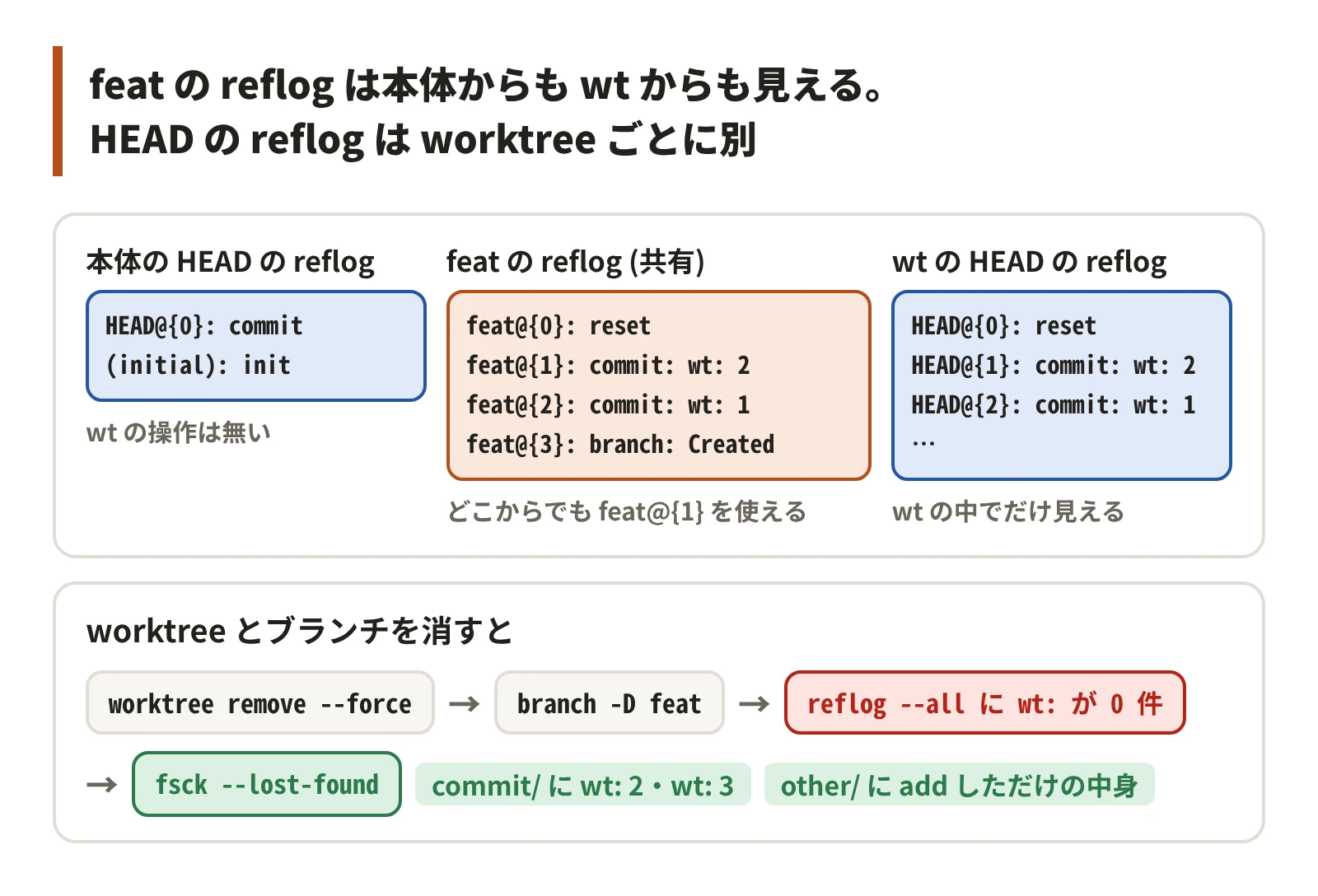
wt で 2 回コミットして 1 つ戻した後、本体から見る。ブランチ feat の reflog は共有なので見え、feat@{1} も使える。本体の HEAD の reflog には wt の操作が無い。
$ git reflog show feat
2adc736 feat@{0}: reset: moving to HEAD~1
fd307b1 feat@{1}: commit: wt: 2
2adc736 feat@{2}: commit: wt: 1
69f057d feat@{3}: branch: Created from HEAD
$ git log --oneline -1 'feat@{1}'
fd307b1 wt: 2
$ git reflog show HEAD
69f057d HEAD@{0}: commit (initial): init
wt の操作は wt の HEAD の reflog に載る。HEAD@{n} はその worktree の HEAD の履歴なので、別の worktree の rebase を取り消すときは <branch>@{n} を使う。
rebase の取り消しにブランチの reflog を使う話は git rebase が警告なしに動かすものと残すもの
に書いた。
$ git -C ../wt reflog show HEAD
2adc736 HEAD@{0}: reset: moving to HEAD~1
fd307b1 HEAD@{1}: commit: wt: 2
2adc736 HEAD@{2}: commit: wt: 1
69f057d HEAD@{3}: reset: moving to HEAD
69f057d HEAD@{4}:
worktree を消すと、その HEAD の reflog も一緒に消える。続けてブランチを消すと、ブランチの reflog も消え、wt で作ったコミットはどの reflog からも辿れなくなる。
wt でもう 1 つコミットし、memo.txt を git add だけしてから消す。
$ git worktree remove ../wt
fatal: '<root>/wt' contains modified or untracked files, use --force to delete it
$ git worktree remove --force ../wt
$ git branch -D feat
Deleted branch feat (was ce71b85).
$ git reflog --all | grep -c 'wt:'
0
object は gc まで残るので、git fsck --lost-found で拾える。どこからも参照されないコミットを .git/lost-found/commit/ に、add だけしたファイルの中身 (blob) を .git/lost-found/other/ に書き出す。
git branch -D の出力に出た sha (ce71b85) も手がかりになる。
$ git fsck --lost-found
dangling blob 05af268930a887aa18b5c602a064e73f5bb89b0f
dangling commit ce71b858dbf1fd075d9c5d0b5188089b4b8a0c60
dangling commit fd307b1e6a5ab6884d0624ff04ade0758d8ca838
$ for f in .git/lost-found/commit/*; do git log --oneline -1 "${f##*/}"; done
ce71b85 wt: 3
fd307b1 wt: 2
$ grep -l '本文にあった言葉' .git/lost-found/other/*
.git/lost-found/other/05af268930a887aa18b5c602a064e73f5bb89b0f
$ git branch rescued ce71b85 && git log --oneline rescued
ce71b85 wt: 3
2adc736 wt: 1
69f057d init
- PITFALL: blob に戻るのは中身だけで、ファイル名は戻らない。
git addもしていない未追跡のファイルは object になっていないので戻らない。参照の無い object は、git gcが既定で 2 週間後に消す (man git-gcの--prune。期限切れは実測していない)
新しい worktree には追跡中のファイルしか入らない
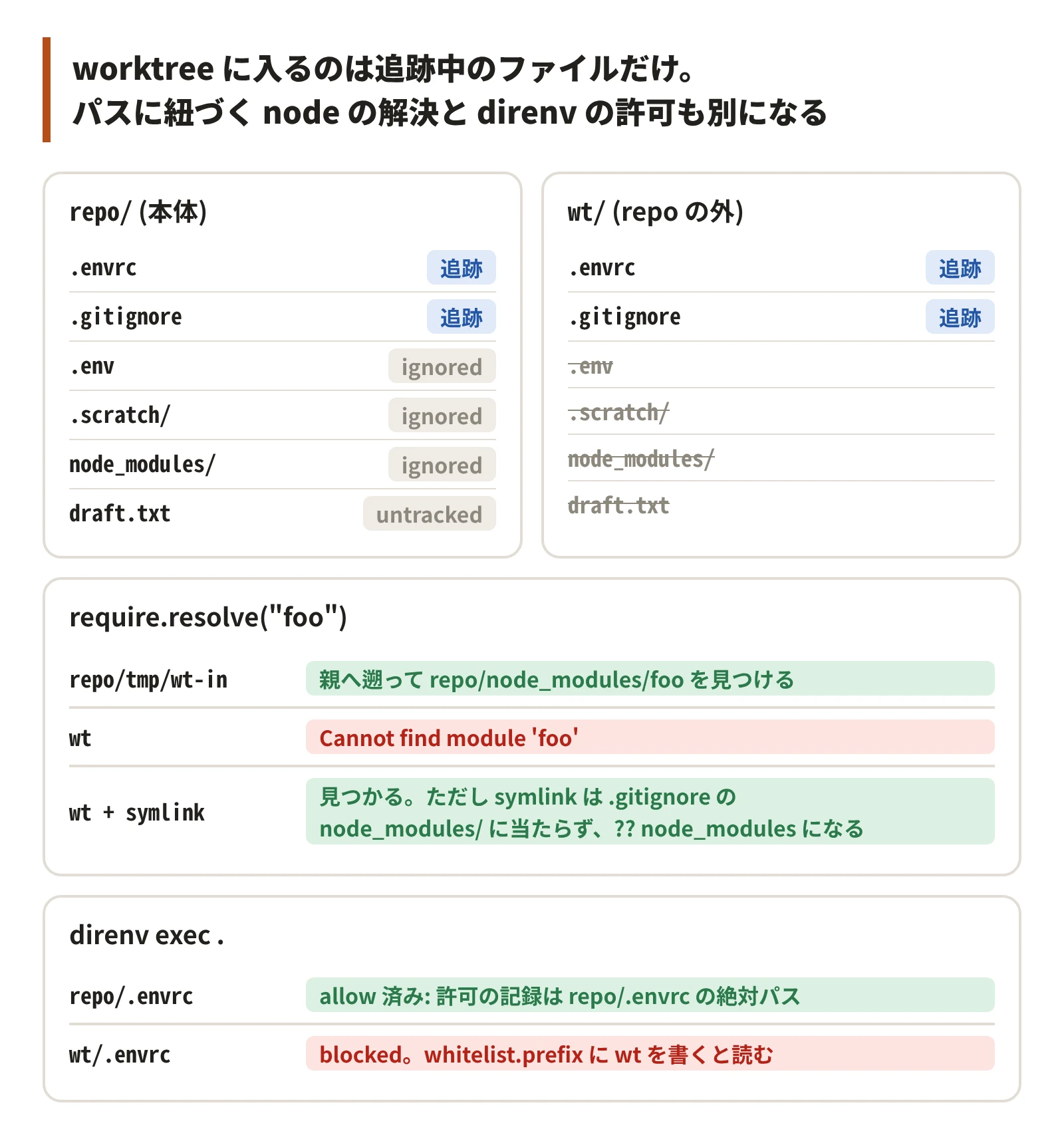
git worktree add はコミットを checkout するだけで、本体の作業ツリーをコピーしない。untracked のファイルも ignored のファイルも、新しい worktree には無い。
printf '%s\n' .scratch/ .env node_modules/ tmp/ > .gitignore
echo 'export GREETING=hello' > .envrc
git add .gitignore .envrc && git commit -q -m "add .gitignore .envrc"
mkdir .scratch && echo memo > .scratch/note.md
echo SECRET=1 > .env
echo draft > draft.txt
mkdir -p node_modules/foo && echo 'module.exports = "foo"' > node_modules/foo/index.js
$ git worktree add -q ../wt -b t2
$ ls -A
.env
.envrc
.git
.gitignore
.scratch
draft.txt
node_modules
$ ls -A ../wt
.envrc
.git
.gitignore
作業メモを repo 内の ignored ディレクトリに置く仕組みは、worktree の中で動くツール (worktree ごとに並列で動かすコーディングエージェントなど) からは見えない。worktree で読ませたいファイルは、commit するか、作った後にリンク・コピーする。
テストやビルドの依存 (node_modules など) も無いので、作った直後に npm install などを打つ。打つ前のテストは「コマンドが無い」で落ち、テストそのものが壊れたように見える。
repo の外の worktree からは、親の node_modules が見えない
node の require は、ファイルのあるディレクトリから親へ遡って node_modules を探す。repo の中 (tmp/) に置いた worktree は遡った先で本体の node_modules に当たるが、repo の外に置いた worktree は当たらない。
repo の中に worktree を置いている間は親の node_modules に届くので、worktree に依存を入れていなくてもビルドが通り、repo の外へ移したときに初めて落ちる。
$ git worktree add -q tmp/wt-in -b t3
$ (cd tmp/wt-in && node -p 'require.resolve("foo")')
<root>/repo/node_modules/foo/index.js
$ (cd ../wt && node -p 'require.resolve("foo")' 2>&1 | grep -m1 Cannot)
Error: Cannot find module 'foo'
親の node_modules を worktree に symlink すると解決する。ただし .gitignore の node_modules/ (末尾 /) は symlink に当たらない。末尾 / はディレクトリにだけ当たり、git は symlink をディレクトリとして扱わないので、git add -A で symlink がコミットに入る。
$ ln -s "$root/repo/node_modules" ../wt/node_modules
$ (cd ../wt && node -p 'require.resolve("foo")')
<root>/repo/node_modules/foo/index.js
$ git -C ../wt status --short
?? node_modules
$ sed -i 's|^node_modules/$|node_modules|' ../wt/.gitignore
$ git -C ../wt status --short
 M .gitignore
- PITFALL: worktree を作ってビルドするスクリプトを、ビルドの代わりに何もしない処理 (スタブ) を置いて試すと、
node_modulesが見えないことに気づかない。worktree を作ったら、本番と同じビルドを 1 回通す
direnv の許可は、.envrc の絶対パスに付く
.envrc は追跡中なので worktree にも入るが、direnv の許可は本体の .envrc のパスに付いているので、worktree の .envrc は未許可のまま止まる。
再現では手元の direnv の許可と設定を使わないよう、XDG_DATA_HOME と XDG_CONFIG_HOME を一時ディレクトリに向けた (既定はそれぞれ ~/.local/share と ~/.config)。
$ export XDG_DATA_HOME=$root/xdg/data XDG_CONFIG_HOME=$root/xdg/config
$ direnv allow .
$ direnv exec . sh -c "echo GREETING=\$GREETING"
direnv: loading <root>/repo/.envrc
GREETING=hello
$ (cd ../wt && direnv exec . sh -c 'echo GREETING=$GREETING')
direnv: error <root>/wt/.envrc is blocked. Run `direnv allow` to approve its content
$ cat "$XDG_DATA_HOME"/direnv/allow/*
<root>/repo/.envrc
許可の記録 ($XDG_DATA_HOME/direnv/allow/<hash>) の中身は .envrc の絶対パスで、パスが変われば未許可から始まる。
worktree を置く場所ごと信頼するなら、自分の direnv 設定 ($XDG_CONFIG_HOME/direnv/direnv.toml) の whitelist.prefix に置き場を書く。repo には何も足さずに済む。
$ cat "$XDG_CONFIG_HOME/direnv/direnv.toml"
[whitelist]
prefix = ["<root>/wt"]
$ (cd ../wt && direnv exec . sh -c 'echo GREETING=$GREETING')
direnv: loading <root>/wt/.envrc
GREETING=hello
git worktree remove --force は、消しきれなくても登録を先に消す
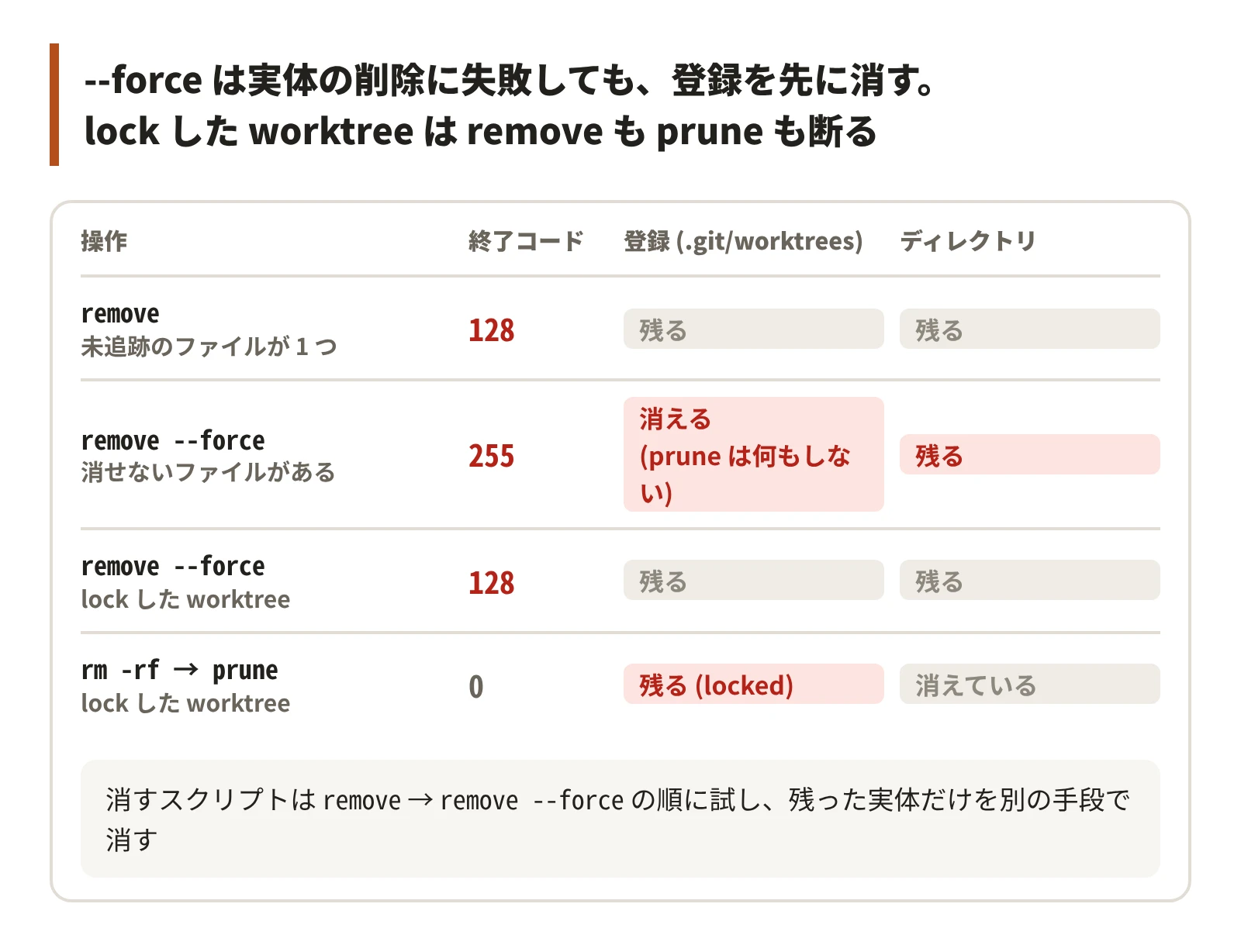
--force 無しの git worktree remove は、未追跡のファイルが 1 つあるだけで 128 で断る。ビルドの成果物やログが残っているだけの普通の worktree でも断られる。
$ echo log > ../wt/build.log
$ git worktree remove ../wt
fatal: '<root>/wt' contains modified or untracked files, use --force to delete it
--force を付けると、ディレクトリの削除が権限で失敗して 255 で終わっても、.git/worktrees/<名前> と一覧のエントリは先に消える。登録が無いので、git worktree prune が消す相手 (prunable の付いた登録) も無く、何もしない。ディレクトリの実体だけが残る。
$ mkdir ../wt/ro && touch ../wt/ro/f && chmod a-w ../wt/ro
$ git worktree remove --force ../wt
error: failed to delete '<root>/wt': Permission denied
$ echo $?
255
$ git worktree list
<root>/repo 69f057d [main]
$ ls .git/worktrees
ls: cannot access '.git/worktrees': No such file or directory
$ ls -A ../wt
.git
build.log
ro
$ git worktree prune -v
消すスクリプトは、--force まで試してから、残った実体だけを別の手段で消す。--force を試さずに sudo rm -rf などへ落とすと、ログが残っているだけの worktree でも毎回そちらへ進む。
git worktree remove "$p" || git worktree remove --force "$p" || true
[[ -e $p ]] && external_remove "$p"   # 実体だけ残るので後始末は必須
git worktree lock は、worktree の登録に「消さない」印を付ける機能。git-worktree(1) は、いつもは接続していない持ち運びのディスクやネットワーク共有に置いた worktree の登録が、prune で消されないようにする用途を挙げている。
lock した worktree は、remove も remove --force も断る。ディレクトリを消してから prune しても、登録は残る。
$ git worktree lock --reason demo ../wt-locked
$ git worktree remove --force ../wt-locked
fatal: cannot remove a locked working tree, lock reason: demo
use 'remove -f -f' to override or unlock first
$ rm -rf ../wt-locked
$ git worktree prune -v
$ git worktree list
<root>/repo      69f057d [main]
<root>/wt-locked 69f057d [b] locked
- PITFALL: エラーは
remove -f -fで押し切れると案内するが、スクリプトで-f -fを使って壊す前に、git worktree unlockを案内する方が安全
使い捨ての --detach worktree で、ブランチの差分を unstaged として見る
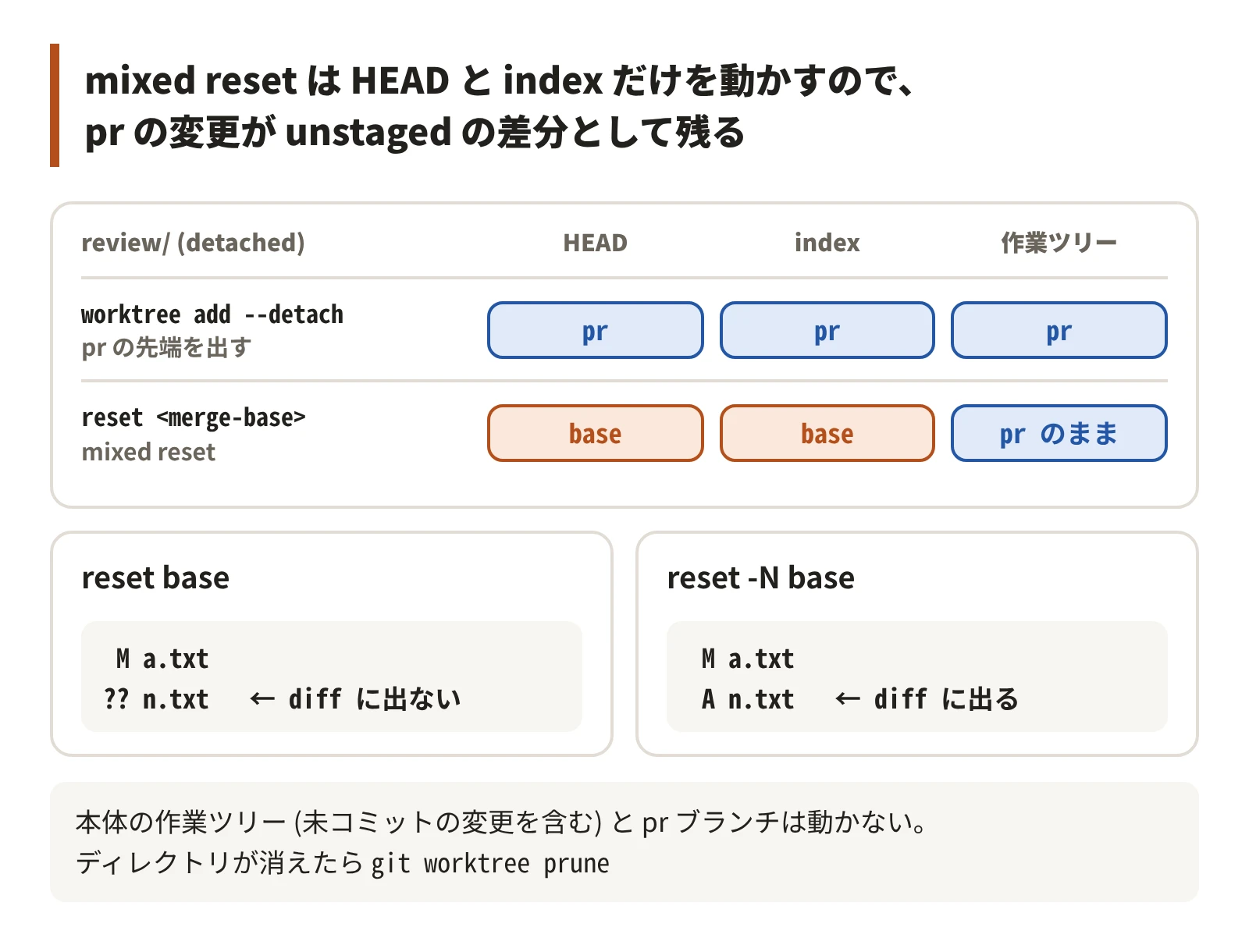
worktree はブランチを checkout しなくても作れる (--detach)。PR のブランチを detached HEAD で使い捨ての worktree に出し、分岐点へ mixed reset (git reset <commit>) すると、PR の変更が unstaged の差分として残る。
mixed reset は HEAD と index だけを動かし、作業ツリーを書き換えないため。gitgutter や tig status のような「unstaged の差分を見る」道具で PR を読める。
b=pr
base=$(git merge-base main "$b")
d=$root/review   # 使い捨てなので、普段は d=$(mktemp -d) で作る
git worktree add -q --detach "$d" "$b"
git -C "$d" reset -q "$base"
$ git -C "$d" status --short
M a.txt
?? n.txt
$ git -C "$d" diff
diff --git a/a.txt b/a.txt
index 7898192..de98044 100644
--- a/a.txt
+++ b/a.txt
@@ -1 +1,3 @@
a
+b
+c
本体の作業ツリー (未コミットの変更を含む) も、pr ブランチも動かない。
$ git status --short
 M a.txt
$ git log --oneline -1 pr
43a0c8e pr: 2
PR で足したファイル (n.txt) は、mixed reset で index から外れて untracked (??) になり、git diff に出ない。git reset -N にすると、外れたファイルを intent-to-add として index に残すので、新しいファイルも diff に出る。
$ git -C "$d" reset -q pr
$ git -C "$d" reset -q -N "$base"
$ git -C "$d" status --short
 M a.txt
 A n.txt
$ git -C "$d" diff --stat
 a.txt | 2 ++
 n.txt | 1 +
 2 files changed, 3 insertions(+)
見終わったら git worktree remove --force "$d" で消す。
- PITFALL: worktree はコミットから作るので、本体の未コミットの変更は入らない。
/tmpが再起動で消えると登録だけが prunable で残るので、git worktree pruneで消す
$ git worktree list
<root>/repo   9c6cfa9 [main]
<root>/review 9c6cfa9 (detached HEAD) prunable
$ git worktree prune -v
Removing worktrees/review: gitdir file points to non-existent location
まとめ
| 場面 | 起きること | 対策 |
|---|---|---|
--git-dir と --git-common-dir をそのまま比べる | 本体のサブディレクトリで worktree と判定される | --path-format=absolute で揃えて比べる |
--show-toplevel で同じ repo かを決める | worktree ごとに違う値になる | common dir を比べる |
git の管理外で dirname "$(git rev-parse ...)" | . になり、cwd を repo のルートと取り違える | 終了コードを見てから使う |
worktree list --porcelain からブランチの worktree を引く | 本体のパスが返る | 本体のルートと比べて止める |
git worktree add <path> <branch> | リモート 1 つにだけあれば、それを upstream にしたローカルブランチを作る。2 つなら fatal | ローカルかリモートにあれば -b を付けない |
| 別の worktree が checkout 中のブランチ | worktree add・checkout -B・branch -D が断られる | git branch の + で見分ける |
worktree で remote set-url | 全 worktree に効く | 分けるなら extensions.worktreeConfig と --worktree |
worktree のディレクトリを rm -rf | 登録が残り、同じパスに add できない | git worktree prune |
| 別の worktree の操作を取り消す | HEAD@{n} に載っていない | <branch>@{n} を使う |
| worktree とブランチを消した | reflog からも消える | git fsck --lost-found で拾う |
| 新しい worktree | ignored・untracked のファイルが無い | commit するか、リンク・コピーする |
| repo の外の worktree | 親の node_modules が見えない | symlink し、.gitignore は末尾 / を外す |
worktree の .envrc | direnv が blocked で止まる | direnv.toml の whitelist.prefix |
git worktree remove | 未追跡のファイル 1 つで 128 | --force まで試す |
remove --force が実体の削除に失敗 | 登録は消え、実体だけ残る | 残った実体を別の手段で消す |
| lock した worktree | remove --force も prune も断る | -f -f で押し切らず git worktree unlock を案内する |
--detach の worktree で mixed reset | 新しいファイルは untracked になり diff に出ない | git reset -N |