Java Spring PROPAGATION_REQUIRED の指定でネストしたトランザクションを制御する

Spring で MyBatis(MySQL) つかって ネストした トランザクション制御しようとして以下エラーに遭遇した Caused by: org.springframework.transaction.UnexpectedRollbackException: Transaction rolled back because it has been marked as rollback-only トランザクションの伝播については、PROPAGATION_REQUIRED の理解が必要 とのことで調べた 要は、明示的に Transaction を貼りたい場合にどういった振る舞いをすべきかを指定する必要があり、 選択肢は以下の2つある PROPAGATION_REQUIRED 存在しない場合は新たに作成、存在する場合は参加 内部スコープがロールバック専用マーカーを設定した場合、外部トランザクションはこれを予期していないため、 予期しないロールバックが発生するとUnexpectedRollbackExceptionがスローされる PROPAGATION_REQUIRES_NEW 常に独立したトランザクションを開始 独立してコミットまたはロールバック可能 以下詳細 PROPAGATION_REQUIREDの理解 tx prop required PROPAGATION_REQUIREDは物理的なトランザクションを強制します。既存のトランザクションがまだ存在しない場合は現在のスコープでローカルに、または大きなスコープで定義された既存の’外部’トランザクションに参加します。これは同一スレッド内の一般的なコールスタックの配置(例えば、すべての基礎となるリソースがサービスレベルのトランザクションに参加しなければならない、いくつかのリポジトリメソッドに委任するサービスファサードなど)では良いデフォルトです。 デフォルトでは、参加するトランザクションは外部スコープの特性に参加し、ローカルの分離レベル、タイムアウト値、または読み取り専用フラグ(あれば)を黙って無視します。異なる分離レベルで既存のトランザクションに参加する際に分離レベルの宣言を拒否する場合は、トランザクションマネージャーでvalidateExistingTransactionsフラグをtrueに切り替えることを検討してください。この非寛容モードは、読み取り専用の不一致(つまり、読み取り専用の外部スコープに参加しようとする内部の読み書き可能なトランザクション)も拒否します。 伝播設定がPROPAGATION_REQUIREDの場合、その設定が適用される各メソッドに対して論理的なトランザクションスコープが作成されます。各論理的なトランザクションスコープは、ロールバックのみのステータスを個々に決定でき、外部のトランザクションスコープは内部のトランザクションスコープから論理的に独立しています。標準的なPROPAGATION_REQUIREDの動作の場合、これらすべてのスコープは同一の物理的なトランザクションにマップされます。したがって、内部のトランザクションスコープで設定されたロールバックのみのマーカーは、外部のトランザクションが実際にコミットする可能性に影響を与えます。 しかし、内部のトランザクショクションスコープがロールバック専用マーカーを設定した場合、外部のトランザクションは自身でロールバックを決定していないため、内部のトランザクションスコープによって黙ってトリガーされるロールバックは予期しないものです。その時点で対応するUnexpectedRollbackExceptionがスローされます。これはトランザクションの呼び出し元がコミットが実行されたと誤って推測することがないようにするための期待される挙動です。したがって、内部のトランザクション(外部の呼び出し元が認識していない)が黙ってトランザクションをロールバック専用とマークすると、外部の呼び出し元はまだコミットを呼び出します。外部の呼び出し元は、ロールバックが実行されたことを明確に示すために、UnexpectedRollbackExceptionを受け取る必要があります。 PROPAGATION_REQUIRES_NEWの理解 tx prop requires new PROPAGATION_REQUIRES_NEWは、対象となるトランザクションスコープごとに常に独立した物理的なトランザクションを使用し、外部のスコープの既存のトランザクションには決して参加しない、という点でPROPAGATION_REQUIREDとは対照的です。このような配置では、基礎となるリソーストランザクションは異なり、したがって、独立してコミットまたはロールバックでき、外部のトランザクションは内部のトランザクションのロールバック状態に影響されず、内部のトランザクションのロックはその完了直後にすぐに解放されます。このような独立した内部トランザクションは、自身の分離レベル、タイムアウト、読み取り専用設定を宣言し、外部のトランザクションの特性を継承しないこともできます。 以下翻訳元 Understanding PROPAGATION_REQUIRED tx prop required PROPAGATION_REQUIRED enforces a physical transaction, either locally for the current scope if no transaction exists yet or participating in an existing ‘outer’ transaction defined for a larger scope. This is a fine default in common call stack arrangements within the same thread (for example, a service facade that delegates to several repository methods where all the underlying resources have to participate in the service-level transaction). By default, a participating transaction joins the characteristics of the outer scope, silently ignoring the local isolation level, timeout value, or read-only flag (if any). Consider switching the validateExistingTransactions flag to true on your transaction manager if you want isolation level declarations to be rejected when participating in an existing transaction with a different isolation level. This non-lenient mode also rejects read-only mismatches (that is, an inner read-write transaction that tries to participate in a read-only outer scope). When the propagation setting is PROPAGATION_REQUIRED, a logical transaction scope is created for each method upon which the setting is applied. Each such logical transaction scope can determine rollback-only status individually, with an outer transaction scope being logically independent from the inner transaction scope. In the case of standard PROPAGATION_REQUIRED behavior, all these scopes are mapped to the same physical transaction. So a rollback-only marker set in the inner transaction scope does affect the outer transaction’s chance to actually commit. However, in the case where an inner transaction scope sets the rollback-only marker, the outer transaction has not decided on the rollback itself, so the rollback (silently triggered by the inner transaction scope) is unexpected. A corresponding UnexpectedRollbackException is thrown at that point. This is expected behavior so that the caller of a transaction can never be misled to assume that a commit was performed when it really was not. So, if an inner transaction (of which the outer caller is not aware) silently marks a transaction as rollback-only, the outer caller still calls commit. The outer caller needs to receive an UnexpectedRollbackException to indicate clearly that a rollback was performed instead. Understanding PROPAGATION_REQUIRES_NEW tx prop requires new PROPAGATION_REQUIRES_NEW, in contrast to PROPAGATION_REQUIRED, always uses an independent physical transaction for each affected transaction scope, never participating in an existing transaction for an outer scope. In such an arrangement, the underlying resource transactions are different and, hence, can commit or roll back independently, with an outer transaction not affected by an inner transaction’s rollback status and with an inner transaction’s locks released immediately after its completion. Such an independent inner transaction can also declare its own isolation level, timeout, and read-only settings and not inherit an outer transaction’s characteristics. ...


2022-09-29 ·  2023-05-13 · 3 分 · 546 文字

Android で kotlin-logging を使用してLogcatと同時にファイル出力も行う

とある案件でネイティブAndroidアプリを作成しているが、内部でエラーが発生したか、 どう動いたかなど、問い合わせがあった場合にログが無い困るケースがあった 標準のログではLogcatで流れてしまい、また端末をPCへ接続できないと、やはりデバッグとしては辛い Android でログをファイル出力する方法を模索し、slf4j 使ってファイル保存することにした。 保存したログファイルは別途S3へアップロード ここでは、slf4j でログ出力するところを記載 app/build.gradle implementation 'org.slf4j:slf4j-api:1.7.25' implementation 'com.github.tony19:logback-android:2.0.0' app/src/main/assets/logback.xml <?xml version="1.0" encoding="UTF-8"?> <configuration debug="true"> <appender name="logcat" class="ch.qos.logback.classic.android.LogcatAppender"> <tagEncoder> <pattern>%d{yyyy-MM-dd HH:mm:ss.SSS} %class{0}.%method:%L</pattern> </tagEncoder> <encoder> <pattern>[%t] %-5level %msg%n</pattern> </encoder> </appender> <property name="LOG_DIR" value="/data/data/${PACKAGE_NAME}/files/logs" /> <appender name="file" class="ch.qos.logback.core.rolling.RollingFileAppender"> <file>${LOG_DIR}/app.log</file> <rollingPolicy class="ch.qos.logback.core.rolling.SizeAndTimeBasedRollingPolicy"> <fileNamePattern>${LOG_DIR}/archives/app.%d{yyyy-MM-dd}.%i.log.gz</fileNamePattern> <!-- each archived file, size max 10MB --> <maxFileSize>10MB</maxFileSize> <!-- total size of all archive files, if total size > 5GB, it will delete old archived file --> <totalSizeCap>5GB</totalSizeCap> <maxHistory>60</maxHistory> </rollingPolicy> <append>true</append> <encoder> <!-- %-4relative [%-20thread] [%thread] %-5level %logger %logger{35} - %msg%n --> <pattern>%d{yyyy-MM-dd HH:mm:ss.SSS} %class{0}.%method:%L [%t] %-5level %msg%n</pattern> </encoder> </appender> <root level="DEBUG"> <appender-ref ref="logcat" /> <appender-ref ref="file" /> </root> </configuration> MainApplication.kt どこからでも呼べるように、kotlin.Any.logger で定義 ...

2022-09-13 ·  2023-04-24 · 2 分 · 228 文字

Go では 複雑でコストのかかる処理を構文で隠してはいけないという基本的なルールがあります。

Go では複雑でコストのかかる処理を隠すような機能は実装されない []string を []interface{} に自動変換する良い方法や提供されている機能は無い func foo([]interface{}) { /* do somthing */ } func main() { var a[]string = []string{"hello", "world"} for(a) } 毎回以下のように実装する必要がある b = make([]interface{}, len(a), len(a)) for i := range a { b[i] = a[i] } 参考 go - Type converting slices of interfaces - Stack Overflow In Go, there is a general rule that syntax should not hide complex/costly operations. Converting a string to an interface{} is done in O(1) time. Converting a []string to an interface{} is also done in O(1) time since a slice is still one value. However, converting a []string to an []interface{} is O(n) time because each element of the slice must be converted to an interface{}. The one exception to this rule is converting strings. When converting a string to and from a []byte or a []rune, Go does O(n) work even though conversions are “syntax”. There is no standard library function that will do this conversion for you. Your best option though is just to use the lines of code you gave in your question: ...

2022-07-15 ·  2022-07-15 · 2 分 · 266 文字

Golang 組み込み構造体へのキャスト方法(Goのポリモーフィズムの実現)

Golang 組み込み構造体へのキャスト方法(Goのポリモーフィズムの実現) Golangで組み込み構造体(親)へのキャストを行いたい場合は(ポリモーフィズムを得るためには)、インターフェイスの実装が必要 子から親への参照はある インターフェースの名前はGolangでは er が慣例 package main import "fmt" type Parent struct { Attr1 string } type Parenter interface { GetParent() Parent } type Child struct { Parent //embed Attr string } func (c Child) GetParent() Parent { return c.Parent } func setf(p Parenter) { fmt.Println(p) } func main() { var ch Child ch.Attr = "1" ch.Attr1 = "2" setf(ch) } // result {{2} 1} 参考 go - Golang interface cast to embedded struct - Stack Overflow あなたは、継承を使ったオブジェクト指向のデザインパターンを使おうとしています。これはGoでのやり方ではありません。また、Javaや同等のオブジェクト指向言語では、インターフェース名は’able’で終わります。Goでは、インターフェイス名は’er’で終わるのが慣例です。 You are trying to use an object oriented design pattern with inheritance. This is not how to do this in Go. Beside, interface names end in ‘able’ in Java or equivalent object oriented languages. In Go the convention is to end interface names with ’er’. ...

2022-07-11 ·  2022-07-11 · 1 分 · 210 文字

go generate assests box

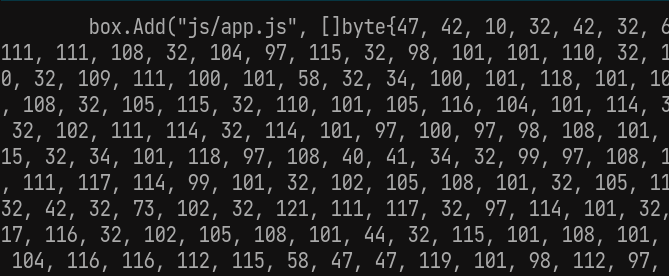
go generate を使った assets ディレクトリの静的組み込みバイナリ処理 モノリポで管理しているSPAなクライアント側の成果物 (dist) を gin で静的配布 できないかと思った際に調べた内容。 結局使用していないが、バイナリ化する手順としては使えそうなのでメモしておく。 ディレクトリは以下の様な形 ├── Makefile ├── assets -> ../../client/back/dist ├── box │ ├── blob.go │ └── box.go └─generator.go Makefile まずは関係ないけど、Makefileって@書けば && バックスラッシュ連結とかいらんのかという発見 ./... 指定で全てを対象に指定 generate: @go generate ./... @echo "[OK] Files added to embed box!" generator.go 1行目はfmtをかけると自動付与された // +build ignore コメントにより通常ビルド対象から外れる設定 生成される go ファイルは blob.go で box 配下に出力される f, err := os.Create(blobFileName) や、 embedFolder string = "../assets/" から current directory は box 配下の模様 //go:build ignore // +build ignore package main import ( "bytes" "fmt" "go/format" "io/ioutil" "log" "os" "path/filepath" "strings" "text/template" ) const ( blobFileName string = "blob.go" embedFolder string = "../assets/" ) // Define vars for build template var conv = map[string]interface{}{"conv": fmtByteSlice} var tmpl = template.Must(template.New("").Funcs(conv).Parse(`package box // Code generated by go generate; DO NOT EDIT. func init() { {{- range $name, $file := . }} box.Add("{{ $name }}", []byte{ {{ conv $file }} }) {{- end }} }`), ) func fmtByteSlice(s []byte) string { builder := strings.Builder{} for _, v := range s { builder.WriteString(fmt.Sprintf("%d,", int(v))) } return builder.String() } func main() { // Checking directory with files if _, err := os.Stat(embedFolder); os.IsNotExist(err) { log.Fatal("Configs directory does not exists!") } // Create map for filenames configs := make(map[string][]byte) // Walking through embed directory err := filepath.Walk(embedFolder, func(path string, info os.FileInfo, err error) error { relativePath := filepath.ToSlash(strings.TrimPrefix(path, embedFolder)) if info.IsDir() { // Skip directories log.Println(path, "is a directory, skipping...") return nil } else { // If element is a simple file, embed log.Println(path, "is a file, packing in...") b, err := ioutil.ReadFile(path) if err != nil { // If file not reading log.Printf("Error reading %s: %s", path, err) return err } // Add file name to map configs[relativePath] = b } return nil }) if err != nil { log.Fatal("Error walking through embed directory:", err) } // Create blob file f, err := os.Create(blobFileName) if err != nil { log.Fatal("Error creating blob file:", err) } defer f.Close() // Create buffer builder := &bytes.Buffer{} // Execute template if err = tmpl.Execute(builder, configs); err != nil { log.Fatal("Error executing template", err) } // Formatting generated code data, err := format.Source(builder.Bytes()) if err != nil { log.Fatal("Error formatting generated code", err) } // Writing blob file if err = ioutil.WriteFile(blobFileName, data, os.ModePerm); err != nil { log.Fatal("Error writing blob file", err) } } box.go //go:generate go run ../generator.go で go generate 時に実行される処理を記載する プロジェクトルートから ./... で全ファイルが対象として起動されたあと、box.go を見つけて、 先頭に//go:generate... があるからその後ろに定義しているコマンドを実行するような動き //go:generate go run ../generator.go package box type embedBox struct { storage map[string][]byte } // Create new box for embed files func newEmbedBox() *embedBox { return &embedBox{storage: make(map[string][]byte)} } // Add a file to box func (e *embedBox) Add(file string, content []byte) { e.storage[file] = content } // Get file's content func (e *embedBox) Get(file string) []byte { if f, ok := e.storage[file]; ok { return f } return nil } // Embed box expose var box = newEmbedBox() // Add a file content to box func Add(file string, content []byte) { box.Add(file, content) } // Get a file from box func Get(file string) []byte { return box.Get(file) } blob.go go generate 後の成果物 generator.go の template 処理で書いている通り、box.Add でバイナリデータをキー(相対パス)に紐付けるコードが生成されている package box // Code generated by go generate; DO NOT EDIT. func init() { box.Add("js/app.js", []byte{0, 0, ... : blob.goの使用方法 fmt.Println(string(box.Get("js/app.js"))) 参考 The easiest way to embed static files into a binary file in your Golang app (no external dependencies) - DEV Community ...

2022-06-22 ·  2023-04-26 · 3 分 · 559 文字