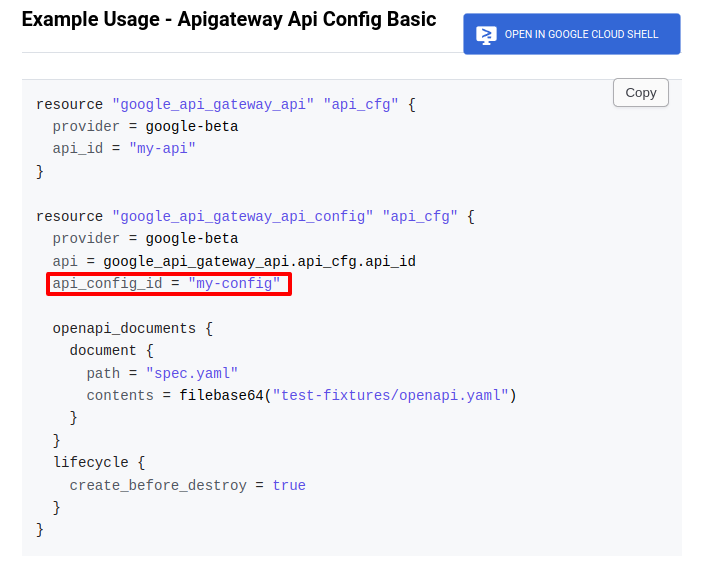
Terraform で google_api_gateway_api_config に api_config_id を設定すると再作成時に罠がある

まとめ Terraform で google_api_gateway_api_config に api_config_id は設定しない 以下詳細 以下のように api_config_id を設定すると、再作成時にエラーが発生する resource "google_api_gateway_api_config" "default" { project = var.project_id provider = google-beta api = google_api_gateway_api.default.api_id api_config_id = "${var.env}-${var.service}-api-config" openapi_documents { document { path = "openapi.yaml" contents = base64encode(templatefile("${path.module}/openapi.yaml", { title = "${var.env} ${var.service} API" description = "This is the API for ${var.env} ${var.service}" version = "1.0.0" managed_service = google_api_gateway_api.default.managed_service func_url = google_cloud_run_service.default.status[0].url })) } } lifecycle { create_before_destroy = true } } │ Error: Error creating ApiConfig: googleapi: Error 409: Resource 'projects/{project_id}/locations/global/apis/{api_id}/configs/{api_config_name}' already exists │ Details: │ [ │ { │ "@type": "type....

2024-11-15 ·  2024-11-15 · 1 分 · 108 文字

GCP ApiGateway + CloudRun で CORS を設定する

構成 GCP ApiGateway -> CloudRun ApiGateway で OpenAPI yaml を定義している 1. OpenAPI yaml で x-google-endpoints に allowCors: True を設定して、バックエンドでCORSリクエストを処理する x-google-endpoints: - name: ${managed_service} allowCors: True # バックエンドでCORSリクエストを処理する 2. CloudRun で OPTIONS メソッドを設定する // 以下のように cors ミドルウェアを挟む http.HandleFunc("/example", cors(user.Handler)) // 定義はこんな感じ func cors(next http.HandlerFunc) http.HandlerFunc { return func(w http.ResponseWriter, r *http.Request) { if r.Method == "OPTIONS" { slog.Info("==> Reply OPTIONS Request", "status", http.StatusNoContent) w.Header().Set("Access-Control-Allow-Origin", "*") w.Header().Set("Access-Control-Allow-Methods", "GET, POST, PUT, PATCH, DELETE, OPTIONS") w....

2024-11-15 ·  2024-11-15 · 1 分 · 105 文字

tflint Tips

はじめに tflint 利用時のメモ 想定するディレクトリ構成 環境は dev, prd など 環境毎にディレクトリを切る 各環境の main.tf から使用したい module を使う module は 機能単位でディレクトリを切る cognitoとかで切ってるけど、サービスの有効無効など、もう少し大きな単位で切っても良いイメージ ├── envs │ ├── dev │ │ ├── main.tf │ │ ├── outputs.tf │ │ ├── swagger.yaml │ │ ├── terraform.tfvars │ │ └── variables.tf │ └── prd │ ├── main.tf │ └── ... └── module_aws ├── cognito │ ├── main.tf │ ├── outputs.tf │ └── variables.tf └── s3 ├── main.tf ├── outputs....

2024-11-08 ·  2024-11-09 · 2 分 · 396 文字

FullCalendar + shadcn Dialog で再レンダリングされるのを防ぐ

問題 FullCalendar と 同じページに shadcn Dialog を組み込み、 shadcn (Radix UI) Dialog の open ステートを useState で管理していると、 ダイアログの open/close 時に FullCalendar が再レンダリングされてしまう。 GoogleCalendarのイベントや、独自イベントがある場合、再レンダリングされると、 イベントが消えてしまう。 解決方法 ref, forwardRefs, useImperativeHandle を使って、再レンダリングを防ぐ。 以下詳細 まずは Dialog側 import { Ref, useMemo, useCallback, useState, forwardRef, useImperativeHandle, } from 'react'; import { Button } from '@/components/ui/button'; import { Dialog, DialogContent, } from '@/components/ui/dialog'; type SampleProps = { }; export interface SampleDialogRefInterface { open: () => void; close: () => void; } const SampleDialogButtonInner = (_: SampleProps, ref: Ref<SampleDialogRefInterface>) => { const [isOpen, setIsOpen] = useState(false); useImperativeHandle(ref, () => ({ open: () => setIsOpen(true), close: () => setIsOpen(false), })); return ( <Dialog open={isOpen} onOpenChange={setIsOpen}> {/* 外部からOpenしたいので、DialogTriggerは使わない */} {/* <DialogTrigger asChild> <Button>ボタン</Button> </DialogTrigger> */} <DialogContent className='h-[90%] overflow-hidden'> {/* 省略 */} </DialogContent> </Dialog> ); // } }; const SampleDialogButton = forwardRef(SampleDialogButtonInner); export default SampleDialogButton; SampleProps 親側から渡す props SampleDialogRefInterface ダイアログとして公開したいメソッドを定義する _: SampleProps props は使わないので、_ で受け取る。propsがないとエラー ref: Ref<SampleDialogRefInterface> ref を受け取る const [isOpen, setIsOpen] = useState(false); ダイアログの open/close ステートを useState で管理 <Dialog open={isOpen} onOpenChange={setIsOpen}> isOpen, setIsOpen を Dialog の open, onOpenChange で紐付け useImperativeHandle ref として公開して、外部から呼ばれた場合の動作を定義 Dialogの開閉を外部から制御できるようにする const SampleDialogButton = forwardRef(SampleDialogButtonInner) forwardRef で ref を受け取るコンポーネントを作成 FullCalendar 側(親側) import { EventClickArg } from '@fullcalendar/core'; import FullCalendar from '@fullcalendar/react'; import { useRef, useCallback } from 'react'; import SampleDialogButton, { SampleDialogRefInterface, } from '@/app/_components/SampleDialogButton'; export default function Calendar() { const sampleDialogRef = useRef<SampleDialogRefInterface>(null); const onDateClick = useCallback( (arg: DateClickArg) => { const target = arg....

2024-09-03 ·  2024-10-23 · 2 分 · 302 文字

TypeScriptで型宣言を優先する理由

はじめに TypeScriptで型の管理方法にはいくつかの選択肢があり、型アサーション、型宣言、型推論などがある。 疑問 なぜ型アサーションよりも型宣言を優先すべきなのか。 型アサーションは便利に見えるが、実際にどのような問題を引き起こす可能性があるのか。 まとめ 型アサーションよりも型宣言を優先すべき型宣言よりも型推論できる状態にすべき 型宣言を使用することで、型安全性が向上し、コードの可読性が高まる。 IDEのサポートが強化され、リファクタリングが容易になる。 TypeScriptの型推論機能を活用することで、冗長なコードを減らせる。 以下詳細 型安全性の向上 型宣言は変数やパラメータの型を明示的に定義するため、コンパイル時に型チェックが行われる。 型アサーションはコンパイラに対して「この型で間違いない」と主張するため、潜在的なエラーを見逃す可能性がある。 コードの可読性 型宣言はコードの意図をより明確に示す。他の開発者がコードを読む際に、変数や関数の期待される型が一目で分かる。 IDEのサポート 型宣言を使用すると、IDEの自動補完やリファクタリング機能がより効果的に機能する。 リファクタリングの容易さ 型宣言を使用していると、後でコードを変更する際に型の不整合を早期に発見できる。 型アサーションを多用していると、これらの問題が見逃される可能性が高くなる。 型推論の活用 TypeScriptの型推論は非常に強力。 型宣言を適切に使用することで、型推論をより効果的に活用でき、冗長なコードを減らせる。 簡単な例: // 型アサーション(避けるべき) const value = getSomeValue() as string; // 型宣言(推奨) const value: string = getSomeValue(); // さらに良い方法(型推論を活用) const value = getSomeValue(); // valueの型は自動的に推論される 型宣言を使用することで、コードの品質と保守性が向上し、長期的にはより堅牢なアプリケーションの開発につながる。 ただし、どうしても型アサーションが必要な場合もあるので、完全に避けることはできない。適切な判断で使い分けることが重要。 Refs TypeScriptの型入門 #TypeScript - Qiita 【TypeScript】できるだけ as を避ける理由

2024-07-26 ·  2024-08-02 · 1 分 · 58 文字