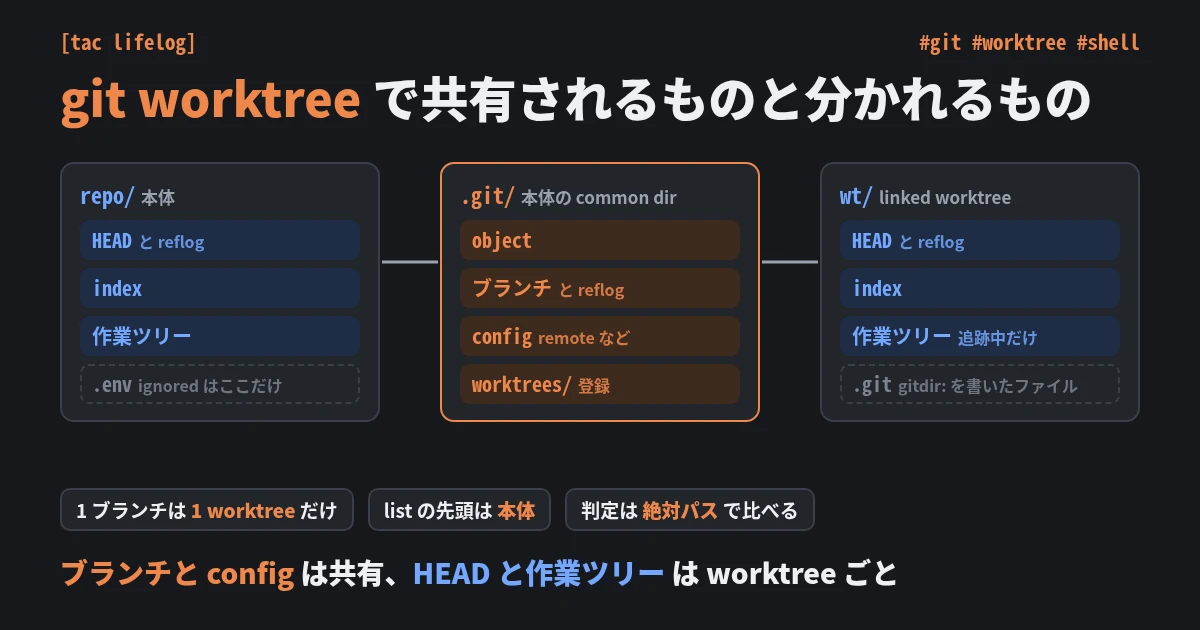
git worktree で共有されるものと分かれるもの

結論 linked worktree は、object・ブランチ (refs/heads/) とその reflog・.git/config を本体と共有する。HEAD とその reflog・index・作業ツリーは worktree ごとに持つ 本体か worktree かは、--git-dir と --git-common-dir を --path-format=absolute で絶対パスに揃えて比べる。揃えずに比べると、本体のサブディレクトリで worktree と判定される 1 つのブランチは 1 つの worktree でしか checkout できず、git worktree list --porcelain の先頭は本体になる。ブランチ名から worktree を引くと、本体のパスが返ることがある 新しい worktree に入るのは追跡中のファイルだけ。ignored の .env や node_modules は無く、パスに紐づく仕組み (node のモジュール解決、direnv の許可) も本体とは別の場所として扱う worktree で作ったコミットは、worktree とブランチを消すと reflog からも消える。gc の前なら git fsck --lost-found で拾える 以下は git 2.56.0 / GNU bash 5.3.20 / Linux x86_64 で実測した。出力の <root> は再現に使った一時ディレクトリで、コマンドのパスは <root> からの相対に縮めて書いた。 ...

2026-11-07 ·  2026-11-07 · 12 分 · 2333 文字

git rebase が警告なしに動かすものと残すもの

結論 git rebase main は、ブランチにあって main に無いコミットを、main の先頭へ 1 本ずつ cherry-pick し直す。git はブランチの派生元を記録しないので、どこから先を載せるかは毎回コミットグラフから求める rebase の後は git merge-base main HEAD が main の先頭を返す。元の分岐点を後で使うなら rebase の前に控える 競合中の --ours は main 側、--theirs は自分のコミット。merge と逆になる 競合しなかったことは、整合していることを意味しない。main が入れた改名や規約は、競合しないファイルには届かない squash merge の後や載せるコミットが 0 件のときは、どこから先を載せるかの推定がずれて、衝突やブランチ先頭の移動が起きる。--onto で起点を明示する autostash の書き戻しが衝突しても、rebase も pull --ff-only も exit 0 で終わる 以下はすべて git 2.55.0 で実測した。pull.rebase や rerere.enabled などの利用者設定で結果が変わるので、GIT_CONFIG_GLOBAL=/dev/null で ~/.gitconfig を読ませずに実行している。 前提: rebase は分岐点から先を作り直す git rebase <upstream> は次の 4 段で動く (man git-rebase)。 今のブランチにあって <upstream> に無いコミットを並べる。<upstream> に同じ変更 (patch-id が一致するコミット) があるものは外す <upstream> の先頭を detach でチェックアウトする 並べたコミットを 1 本ずつ cherry-pick する ブランチをできあがった先頭へ付け替える 1 の範囲は git log <upstream>..HEAD と同じで、分岐点から先にあたる ( git logの「..」と「…」の違い )。 ...

2026-09-29 ·  2026-09-29 · 7 分 · 1435 文字

git logの「..」と「...」の違い

結論:「..」は片方、「…」は両方の差分 git logの..(ドット2つ)と...(ドット3つ)は、ブランチ間のコミット比較方法が異なる。 ..(2ドット): 一方のブランチにのみ存在するコミット ...(3ドット): 両方のブランチで異なるコミット全て 使い分け ..(2ドット)- 未マージのコミットを確認 developにあってmainにないコミット(未マージ分のみ) git log origin/main..origin/develop 用途: PR前の差分確認 マージ漏れチェック リリース対象の確認 結果: developにしかないコミットのみ表示(mainには既にあるコミットは除外) ...(3ドット)- 分岐後の全差分 mainとdevelopの差分(どちらか一方にしかないコミット全て) git log origin/main...origin/develop 用途: ブランチの分岐点以降の変更全体を確認 両ブランチの独立した開発内容を比較 結果: mainにのみあるコミット + developにのみあるコミット 視覚的に確認 # グラフで分岐を表示 git log --oneline --graph origin/main...origin/develop --graphオプション: コミットの分岐・マージをビジュアル化 どちらのブランチに属するか一目で分かる 具体例 状況 main: A - B - C - D \ develop: E - F - G ..(2ドット)の結果 git log main..develop # 結果: E, F, G(developにのみ存在) git log develop..main # 結果: C, D(mainにのみ存在) ...(3ドット)の結果 git log main...develop # 結果: C, D, E, F, G(両方の差分) よくある用途 PR作成前のコミット確認 # featureブランチにあってmainにないコミット git log main..feature リリース対象の確認 # developにあってmainにない(次のリリース内容) git log origin/main..origin/develop --oneline 両ブランチの独立した変更を比較 # mainとdevelopで独立して開発された内容を全て表示 git log origin/main...origin/develop --oneline --graph まとめ 記法 意味 用途 A..B Bにあって Aにないコミット 未マージ確認 PR差分確認 A...B AとBで 異なる全コミット 分岐後の全変更 両ブランチ比較 ..(2ドット): 片方にしかないコミット(未マージ確認) ...(3ドット): 両方で異なるコミット全て(分岐後の全変更) --graph: 視覚的に分岐を確認

2025-11-22 ·  2025-11-22 · 1 分 · 130 文字

Gitコマンドあれこれ

コミットユーザ名を設定する git config --global user.name [UserName] コミットユーザ名を設定する git config --global user.email [Email] コミット時等に使用するエディタを設定する # vim(Linux,mac) git config --global core.editor "vim -c 'set fenc=utf-8'" # Sublime(Liux,mac) # subl コマンドが登録できていない場合は以下も実行(mac) # "/Applications/Sublime Text.app/Contents/SharedSupport/bin/subl" "/usr/local/bin/subl" git config --global core.editor "subl -w" # Sublime(windows) git config --global core.editor "'C:/Program Files/Sublime Text 3/sublime_text.exe' -w" git の標準出力をカラーリングする git config --global color.ui auto git push 時の宛先省略時のデフォルト動作設定 simple: カレントブランチに追跡ブランチが設定されている、 かつローカルとリモートのブランチ名が同じである場合に、追跡ブランチに対して push する。 git config --global push.default simple 日本語ファイルの文字化け対応 git config --global core.quotepath false 現在のブランチのトラッキング先を設定する git branch --set-upstream-to=origin/master git コマンドのエイリアス設定 git config --global alias.co checkout git config --global alias.cm commit git config --global alias.st status git config --global alias.br branch git config --global alias.lg "log --graph --pretty=format:'%Cred%h%Creset -%C(yellow)%d%Creset %s %Cgreen(%cr) %C(bold blue)<%an>%Creset' --abbrev-commit --date=relative" git config --global alias.lga "log --graph --all --pretty=format:'%Cred%h%Creset -%C(yellow)%d%Creset %s %Cgreen(%cr) %C(bold blue)<%an>%Creset' --abbrev-commit --date=relative" Git差分のあるファイルをSCP転送する git status --short |awk '{print substr($0, 4, length($0) - 3)}' |xargs -I 'send_file_path' scp send_file_path server:/対象ディレクトリ/send_file_path

2015-07-18 ·  2015-07-18 · 1 分 · 147 文字